7 minute read time
Smart Ways to Use Custom Fields

This post has been updated as of May 2019
When you set up a subscriber list in Campaign Monitor, you start with just an email address and perhaps a name. If you’ve dug around a bit more, you might’ve noticed that you can add some more custom fields into each list, up to 50 in addition to the built-in name and email.
At their most basic, custom fields can be a great way to capture and store additional information about your subscribers. You might have a subscribe form on your website that also asks your visitors about their specific interests, and pass that information back to your own database.
Read on to discover some of the cooler ways you can make use of those 50 extra fields in your actual email campaigns.
Custom images
This is something that can make your emails look really varied but is actually quite simple. If you’d like to show different images to different subscribers, you can use the value of a custom field right inside an image link. For example, a car dealership could insert a photo of the specific model each customer has expressed interest in.
To make it happen, first, you need the actual data in your custom field. In this example, a subscriber might have a field called “favcar” with a value of “datsunsunny.” To turn that into a picture of said Datsun, your HTML would look like this:
<img src="https://www.yourwebsite.com/images/[favcar,fallback=genericcar].jpg" alt="A photo of your favourite car" width="150" height="100" cm_dontimportimage >
When our Datsun lover opens his copy of your email, the image path will become //www.campaignmonitor.com/assets/uploads/datsunsunny.jpg. If a recipient hasn’t specified a favorite car, then the fallback image will be shown instead.
Note the cm_dontimportimage attribute there. That stops Campaign Monitor from trying to import the custom image along with all your other images. Instead, it’s referenced from your own server.
There are a lot of ways you might use custom images to make your emails even more targeted to each reader. Let us know if you have any ideas in the comments below.
Unique URLs
Do you have customer IDs that you would like to pass from your email through to your website? You could store those IDs in a custom field, and then insert them into a link as a parameter. Just like the custom images above, it’s a simple matter of using the correct tag inside the link.
<a href="https://www.yourwebsite.com/login.php?user=[id,fallback=]">Login to your account</a>
Custom permission reminders
One of the best ways to avoid being trashed is to remind your readers how and where they signed up to your list. You might have a list that people always join via a single form, and, in that case it’s very easy to write a simple permission reminder.
On the other hand, you might sign people up online, in your store, at a tradeshow, or on the street. and that can be hard to explain in a simple way.
If you plan ahead, you can store the source of each signup in a custom field, and then use that field to construct custom permission reminders. We’ve written about this before in How to personalize your permission reminders, so check out that post for more.
Add a personal connection
A very common use of email newsletters is for salespeople to keep in touch with their customers and potential customers. Often, all the salespeople at a particular organization are sending out the same newsletter. By using a custom field to store the name of the salesperson for each subscriber, head office can send one campaign, but still have each email refer to the relevant contact for the recipient.
That might mean inserting the salesperson’s name in the footer, their contact details, or even using the custom images we’ve discussed above to add their photo. It’s a simple way to create a more valuable email.
Coupon codes
You can send a campaign out to all your subscribers offering a discount with a single code, and that would work great, but what if you wanted to know exactly who responded, and who sent their code on to others?
A custom field with a unique coupon code could be your answer. You insert the code into the email, and then you have a neat way of tracking back to find out which customer was most enthusiastic, who forwarded it on to their friends, and so on.
Those are just a few of the ways you could be using your custom fields to create more targeted and valuable email campaigns. Remember that every list can have up to 50 custom fields, and, in each field, you can have up to 250 characters of data.
The importance of custom fields
Why bother to add custom fields in your email list? Why not just use an email address and send exactly the same email to your entire email list? The answer lies in one word: personalization.
What is personalization in email?
Personalization is the use of subscriber data within an email with the aim of creating email content that feels tailor-made for the recipient. This technique has been proven to increase open and click-through rates. Conversion rates also skyrocket, with some marketers reporting as much as a 760% increase in revenue.
What does this have to do with custom fields?
Everything.
Custom fields, segmentation, and personalization
When you add custom fields in your list, you’re able to add personalization tags to each of your recipients like the ones we discussed above. These tags are essential in helping you segment your email list. It goes without saying that advanced custom fields afford you advanced segmentation and, thus, the ability to personalize your emails in such a way that your subscribers will feel like you’re best friends.
That’s the key to gaining trust and winning loyalty.
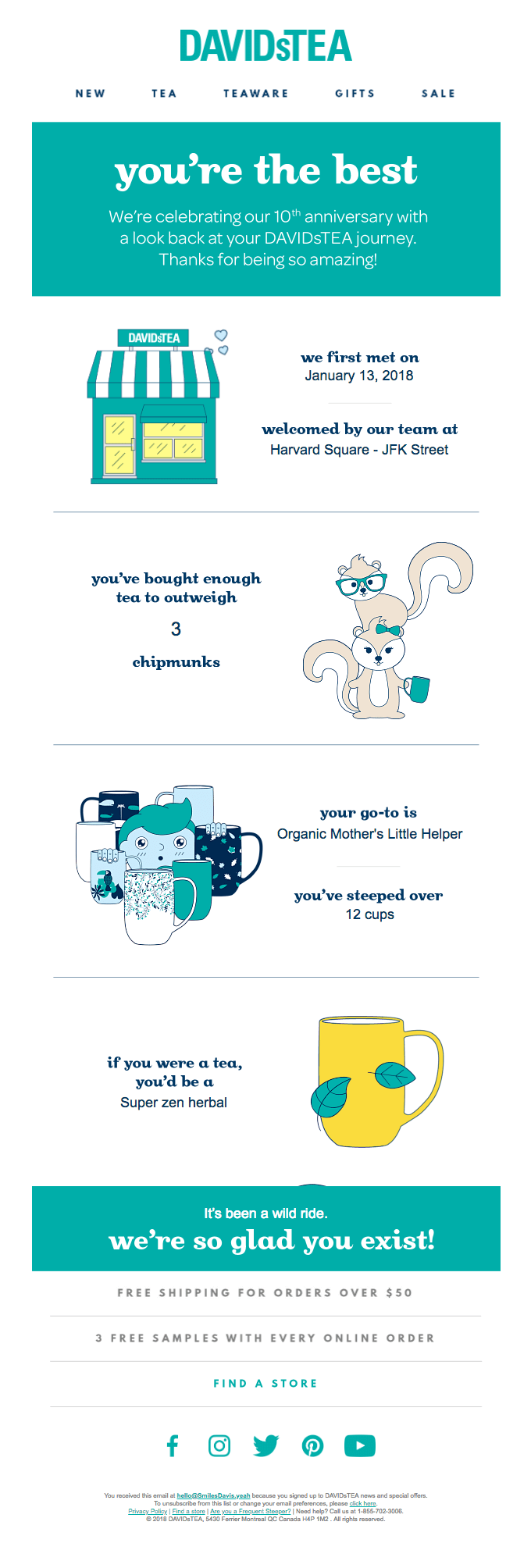
Source: Really Good Emails
Therefore, when you add custom fields, you’re not doing it to be fancy. You’re doing it to connect with your customers on a deeper level—resulting in them becoming loyal customers.
Do you really need to add custom fields?
If you think adding custom fields and segmenting your list is too much work that you can put off, think again. Because custom fields are key when it comes to creating targeted personalized email campaigns, failing to do so has a few repercussions. Here are the top three:
- You risk ending up in the trash folder.
People’s inboxes are full, and sifting through relevant emails is time-consuming. One technique people use to search through emails is personalization. Subscribers look for emails that address them personally, not just an email on a list.
More often than not, business emails that don’t have a personalized subject line end up going unopened or to the trash box.
- You lose out on revenue.
According to research, personalized emails generate six times higher transaction rates than emails that are general. Failure to personalize your emails, in other words, is losing you revenue. The reason for this higher transaction rate, according to Campaign Monitor’s own research, is that emails with personalized subject lines are 26% more likely to be opened.
- You’ll lose subscribers.
Gone are the days when people eagerly opened an email that was general. The novelty has long worn off. Today, people are looking for a personalized experience with every email they receive.
Failure to provide this experience will lead to a subscriber exodus.
Wrap up
With the way the email marketing landscape is becoming more competitive, you need to leverage everything at your disposal to be ahead of your competition, and adding custom fields will make a huge difference for you in this regard.
Need more tips on getting ahead of the pack when it comes to the race to the inbox?
Check out our guide on how you can create targeted email campaigns using advanced personalization techniques.
This post was originally published in February 2009