8 minute read time
Email, Phone Home: Initiating Voice Calls from HTML Email Newsletters

At one point in time, mobile devices were primarily used for calling friends and family. However, those days are long gone, and we’ve since graduated to using our iPhones and Androids to do everything from playing Angry Birds to surfing the web. Nonetheless, voice calling still has its place in the world. That’s why you need your HTML clickable phone number in your emails.
There are plenty of businesses that still rely on phone calls to make their living—from Thai take-out restaurants to your local salon. Perhaps even you and your clients fit into this category too.
Read on to discover how you can get your subscribers to place calls from an HTML email newsletter received in their desktop, web, or mobile email client. Featured is an example HTML email newsletter (pictured) that you can download, adapt, and use to learn more about this technique.
How does an HTML clickable phone number work?
Creating links for convenient calling is nothing new. Before either of the above were utilizing these links, Skype URLs were commonplace on the web. Skype is a program that can be installed on Windows and Mac machines, as well as on iOS and Android phones. As of 2017, Skype hit an average of 300 million monthly active users.
These methods are adaptable for use in HTML email. The resulting links can be customized, meaning that you can turn a phone number or Skype username into a bold call to action. To demonstrate, look at the example template (click to view):
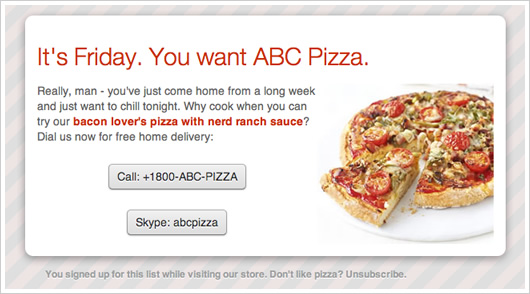
The “Call:” button has been disabled in most browsers, and this will be discussed later in this article.
How do I make an HTML clickable phone number?
When learning how to make phone numbers clickable, it all comes down to how skilled you are in HTML coding.
Coding is something that is now taught in schools as a part of their regular curriculum. However, that wasn’t always the case, so, coding can seem quite complicated for many.
However, there are quite a few tools available to help simplify the process. For example, websites such as Wix and WordPress allow for simple website setups, with no prior coding knowledge necessary.
The same is available for marketing tools as well. Here at Campaign Monitor, for example, we allow clients to access and edit email HTML to help them create interactive email campaigns. This option does require HTML coding knowledge. However, clients can always make use of our email builder if they don’t have experience in this area.
How do I make a “Click to Call” link via HTML code?
Although there are other options for those who are inexperienced with HTML coding, it is essential to have a basic idea of what your codes should look like before you start working on it.
One of the most basic HTML codes that email marketers will want to be familiar with is how to make a clickable phone number in their email, newsletter, and other promotional materials.
Before covering the detailed coding knowledge needed for things such as Skype numbers and other content, we will look at the basic HTML code needed to make a clickable phone number.
To do this, open your HTML editor and then follow these steps in order:
- Start your code with <a href=“”></a>
- Make a note of where the quotation marks are, because you’ll now enter your business phone number between the quotes. Make sure to enter it without dashes and enter “tel:” before you start typing your number. For example: <a href= “tel:+YOURNUMBERHERE”
- Next, you’ll add any text you wish to link. This text will go between the ><. The text that gets entered here will be your call to action (CTA) followed by your phone number again. EX: >Call Us at +YOURPHONENUMBERHERE<
Below is how the entire code looks once you’ve put it all together:

Some email clients cause coding headaches
When testing email newsletters on the iPhone and in Gmail, we found that both email clients automatically wrap phone numbers with <a> tags like in the following example:
<a href=“tel:555-666-7777”>555-666-7777</a>These tags can be a massive annoyance for email designers, as these ‘new’ tel: links tend to be bold, bright blue, and often difficult to style with CSS.
Beating the headache: linking to telephone numbers and Skype usernames
There is a universal fix for this issue: preemptively adding your own tel: links to the HTML code. Using this method, you can also add phone number links wherever you see fit. For example, this can be in your call to action or surrounding a “call us now” line in your copy:
To order a pizza, <a href=“tel:555-666-7777”>call us now</a>.The same can be done with Skype links:
Skype us on <a href=“skype:555-666-7777”>555-666-7777</a>.
Don't forget to add <a href=“skype:abcpizza”>abcpizza</a> to your contacts!
The downside of this method is that, for the links to be detectable within email clients, we can’t convert them into tracking links for use in Campaign Monitor campaign reports. To turn off tracking specifically for these links, we use the cm_dontconvertlink attribute:
To order a pizza, <a href=“tel:555-666-7777” cm_dontconvertlink>call us now</a>.However, not all email clients know how to deal with tel: links. Skype has to be on the recipient’s machine for skype: links to work. With this in mind, here’s what support looks like across the major email clients:
| Desktop email clients | Tel: Support | Skype: Support |
| Outlook 2007/2010 | No | Yes |
| Outlook 2003 | No | Yes |
| Apple Mail | No | Yes |
| Windows Live Mail | No | Yes |
| Thunderbird | No | Yes |
| Webmail clients | Tel: Support | Skype: Support |
| Hotmail | No | No |
| Yahoo! Mail | No | Yes |
| Gmail | Yes | No |
| AOL | No | No |
| Mobile email clients | Tel: Support | Skype: Support |
| iPhone | Yes | Yes |
| Android (Gmail) | Yes | No |
| Android (default) | Yes | No |
| BlackBerry 6 OS | Yes | No |
| Windows Mobile 7 | Yes | No |
While tel: support is great across mobile clients, it can be unreliable on the desktop and in webmail clients. Conversely, skype: support is extremely successful on desktop clients, but ineffectual on mobile and webmail clients (unless you have the Skype web toolbar installed).
Disabling tel: links in desktop and webmail clients
Given the inherent troubles in featuring tel: links in anything but mobile email clients, the best option is to turn them off. This can be done by nesting the link text in a block-level element (e.g., a table), wrapping this with the tel: link, then applying the following CSS:
a.disable-link {
	pointer-events: none;
	cursor: default;
}
...
<a href=“tel:1800ABCPIZZA” class=“disable-link” cm_dontconvertlink>
   <table>
      <tr>
          <td> Call: +1800-ABC-PIZZA </td>
      </tr>
   </table>
</a>
The tel: link above is inactive in Outlook, Apple Mail, Thunderbird, and most browser/webmail combinations. However, Google Voice still picks up on tel: links, even with the workarounds above.
In mobile email clients, we’ll activate the link by using a query:
@media only screen and (max-device-width: 480px) {
   a[class=“disable-link”] {
      pointer-events: auto !important;
      cursor: auto !important;
   }
}
Nicely done, if I say so myself.
<!–
The template, yours to download and tweak
This isn’t a perfect solution due to the lack of tracking and limitations with tel: support. However, if your business relies on phone inquiries, then you can build very innovative campaigns around this technique.
Much appreciation is due to vlanzoiz, for the inspiration and early testing, and Panic, for allowing me to use their design again. If you have any questions or comments on initiating phone calls from email newsletters, we’d love to hear them in the comments below.
Again, following is the HTML code to create a clickable phone number for you to use and tweak as you see fit.

Wrap up
The thought of HTML coding alone can cause some to experience instant headaches. However, with all the technology that is available, it doesn’t have to be this way.
Thanks to HTML editors and programs built with marketers in mind, inserting HTML coding into your emails, newsletters, and other marketing materials can be simple.
HTML coding could help you insert the following into your email campaigns:
- Simple-to-follow CTAs for consumers
- Clickable Phone Numbers
- Clickable email addresses that open right into a given email app
- Clickable Skype numbers
- Enable consumers to send a text message to a given number
Want to take your email campaigns to the next level? With Campaign Monitor’s Email Builder and HTML editor adding clickable phone numbers and other CTAs is a breeze!