Email marketing isn’t just cost-effective—it’s a relationship-building powerhouse that gives small businesses direct access to their customers’ inboxes without the gatekeepers of social platforms or search engines.
In this comprehensive guide, you’ll discover:
- The psychological triggers that make subscribers open emails within seconds
- Time-saving automation secrets that work while you sleep
- The “Value-to-Frequency” ratio that keeps subscribers engaged without overwhelming them
TL;DR
- Build 5 key sequences: Welcome (immediate), nurture (3-5 days apart), cart recovery (1-2 hours), re-engagement (30 days), post-purchase (7 days)
- Grow list ethically: Exit popups, problem-solving lead magnets, social media integration
- Segment by behavior: Group by purchase history and engagement
- Choose the right email marketing platform like Campaign Monitor, which offers a range of features including automation, segmentation, and AI-powered content optimization.


Essential Email Sequences for Small Business Success
The foundation of effective email marketing for small businesses isn’t sending random newsletters whenever you remember. It’s creating strategic, automated sequences that nurture relationships and drive specific actions.
#1) Welcome Sequence (3-5 emails)
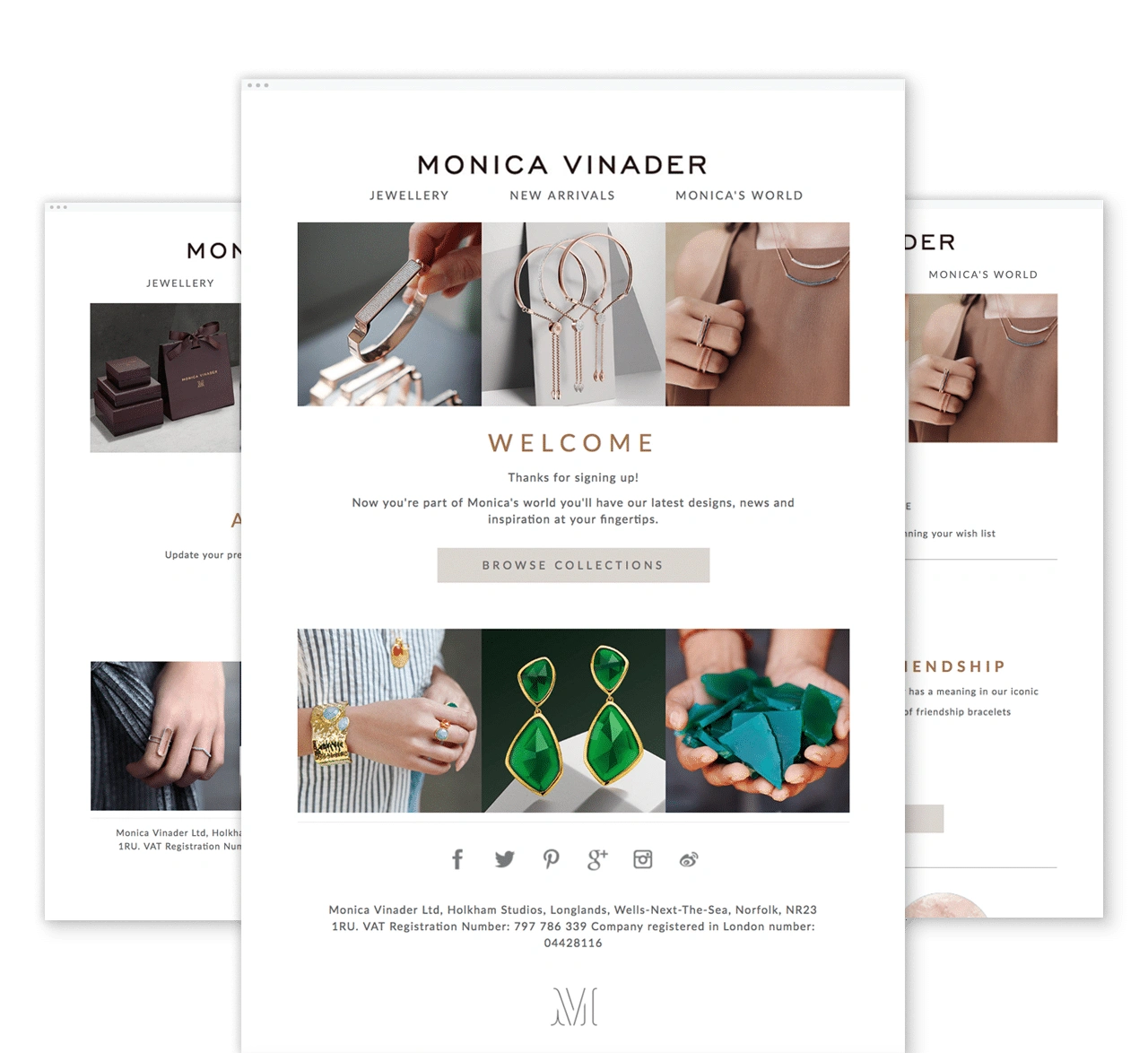

Your welcome sequence is your digital handshake—it sets expectations and builds an immediate connection with new subscribers.
What to include:
- Initial welcome email: Welcome emails have a whopping 91.43% open rate. Send immediately after signup with a warm greeting. Include a simple, low-commitment action, like clicking a link to explore your best-sellers or browsing your most popular blog post. This initial engagement helps you start strong.
- Brand story email: Share your brand’s story, but make it relatable. Instead of a generic “About Us” message, focus on why your brand exists and how it can make their life better. Show how your values align with their needs. Use storytelling that connects emotionally and makes your mission clear—this is how you turn a subscriber into a loyal follower.
- First-purchase incentive: Offer a compelling discount or an exclusive deal. Make it irresistible by framing it as a limited-time opportunity. For example, “Use code WELCOME10 for 10% off your first order—expires in 48 hours.” This creates urgency and nudges immediate action.
- Educational content: Provide instant value by sharing practical tips, guides, or helpful resources that address their pain points. For instance, if you’re selling fitness gear, share workout tips or a beginner’s guide to fitness. This positions you as a valuable resource, not just a brand selling products.
- Preference setting: Ask subscribers to share their preferences through a quick, easy-to-answer poll or a short survey. Use this data to segment them for better-targeted email campaigns in the future. For example, you might ask: “What type of content would you like to receive from us? (Product updates, Tips & Tricks, Exclusive offers).” This ensures your follow-up emails are more relevant to their interests.
#2) Nurture Sequence (4-7 emails)

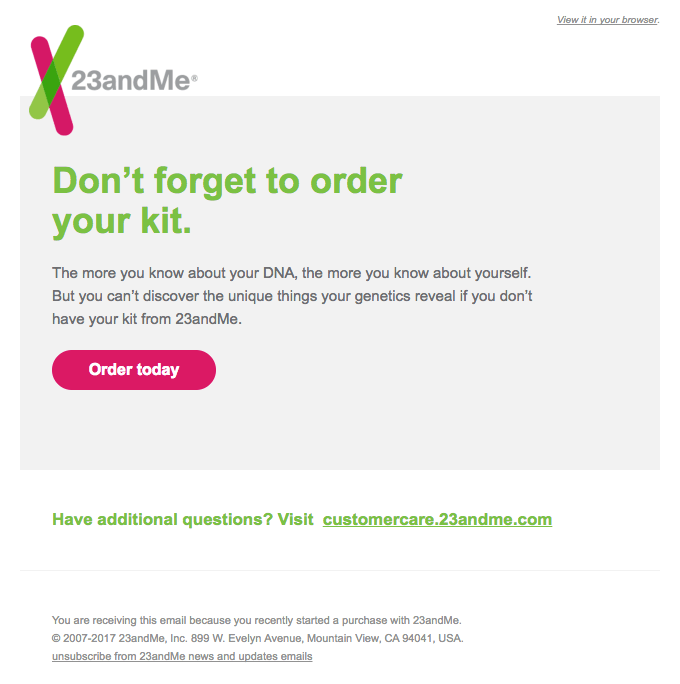
source: ReallyGoodEmails (https://reallygoodemails.com/behavioral/abandoned-cart/your-dna-kit-is-waiting-for-you)
The nurture sequence builds trust and positions your business as the solution to your subscriber’s problems.
Effective structure:
| Content Focus | Timing |
|---|---|
| Acknowledge pain points | Day 3 after welcome |
| Explain how your product/service addresses their specific problem | Day 5 |
| Share testimonials/case studies | Day 8 |
| Introduce your product/service with a small incentive (e.g., “10% off your first order”) | Day 10 |
| Address common queries/concerns | Day 12 |
| Present your main offer (e.g., “Buy one, get one free on all products”) | Day 14 |
| Create urgency with a limited-time deal (e.g., “Offer ends in 48 hours!”) | Day 16 |
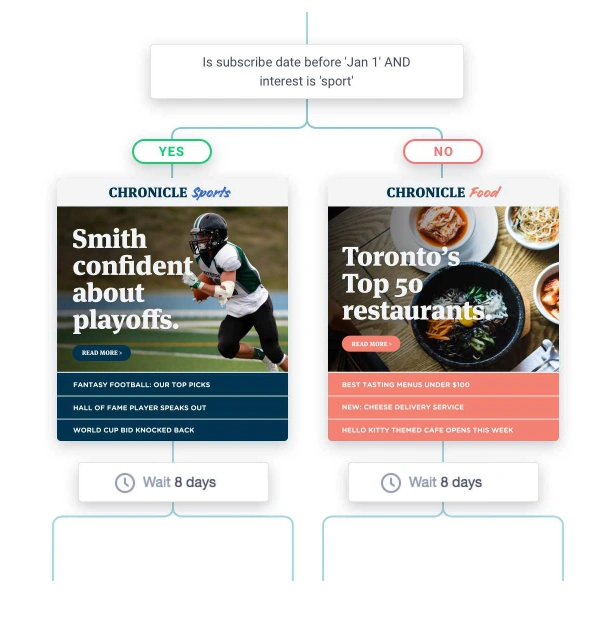
Implementing audience segmentation allows you to tailor each email in the nurture sequence to address the specific needs and interests of different subscriber groups.
Campaign Monitor’s journey builder allows you to create these sequences once and let them run automatically. For example, set up a journey that automatically sends a welcome email when someone subscribes, followed by a product tutorial on day 3 and a discount offer on day 7. This keeps your subscribers engaged without manual effort, helping you nurture leads and increase conversions.

#3) Abandoned Cart Recovery Sequence (3-4 emails)


Source: ReallyGoodEmails (https://files.reallygoodemails.com/emails/ready-to-order.png)
Don’t let potential sales slip away—a strategic abandoned cart sequence can recover otherwise lost revenue.
Why abandoned cart emails work:
- 45% of cart abandonment emails are opened
- 21% of emails get clicked
- 10.7% lead to completed purchases
| Content Focus | Timing | |
|---|---|---|
| 1. Gentle Reminder | “You left something in your cart!” Include product image, name, and price. Keep it helpful rather than pushy. | 1-2 hours after abandonment |
| 2. Address Objections | “Still thinking about it? Here’s why customers love this product…” Include reviews, FAQs, or guarantees that overcome common hesitations. | 24 hours after abandonment |
| 3. Incentive | “Complete your purchase and save 10%” Offer a time-limited discount, free shipping, or other incentive to encourage completion. | 48 hours after abandonment |
| 4. Final Notice | “Last chance: Your cart will expire soon” Create urgency by mentioning the cart will be cleared or items may sell out. | 3-5 days after abandonment |
Campaign Monitor’s dynamic content blocks help personalize each abandoned cart email with the exact products left behind, including images, prices, and direct links back to checkout. This visual reminder is significantly more effective than text-only notifications.
#4) Re-engagement Sequence (4 emails)


Source: ReallyGoodEmails (https://files.reallygoodemails.com/emails/who-wouldnt-love-these-bad-boys.png)
Don’t let inactive subscribers languish in your database—either win them back or let them go to maintain list health.
Here’s how you can structure your re-engagement sequence:
| Content Focus | Timing | |
|---|---|---|
| 1. Gentle Reminder | “We miss you! Here’s what you’ve been missing…” Highlight recent updates or content they may have missed. Keep it light and inviting. | Day 1 of inactivity |
| 2. Offer | “We’d love to have you back—enjoy 15% off your next order!” | Day 5 of inactivity |
| 3. Feedback Request & Offer Reminder | “We want to hear from you—do you have any concerns or feedback? Is there something we can improve? Plus, enjoy free shipping and 10% off your next order as our way of saying thanks for sharing your thoughts!” | Day 10 of inactivity |
| 4. Last Chance | “We don’t want to lose you! Your 10% off expires in 48 hours—stay with us and enjoy the savings before it’s gone.” | Day 12-15 of inactivity |
Why this matters: Maintaining a clean list improves deliverability and saves you money on your email marketing platform subscription, as most charge based on subscriber count.
#5) Post-Purchase Sequence (3-4 emails)


The customer journey doesn’t end at purchase—it’s just the beginning. A thoughtful post-purchase sequence can turn one-time buyers into loyal advocates.
| Content Focus | Timing | |
|---|---|---|
| 1. Purchase Confirmation | “Thank you for your purchase! Here are your order details.” Include an order summary and expected delivery time. | Immediately after purchase |
| 2. Delivery/Usage Instructions | “Your order is on its way! Here are some tips to maximize your product experience.” Provide helpful usage tips or how-to guides. | Triggered when the order is shipped |
| 3. Review Request | “We’d love to hear your thoughts! How are you enjoying your new product?” Include a link to leave a review. | 7-10 days after product delivery |
| 4. Cross-sell/Upsell | “We thought you might love these products too!” Recommend related items. | 10-14 days after purchase |
Small businesses can add personal touches to these automated sequences—like a personal note from the founder or custom recommendations based on purchase history.
Read Next:
Building Your Email List
The quality of your email list directly impacts your results. Focus on attracting people who genuinely want to hear from you rather than growing your numbers artificially.
Website sign-up forms
Many email marketing services offer advanced tools for creating and managing sign-up forms, making it easier to grow your list ethically.
Strategic placement matters:
- Pop-ups: The average conversion rate for pop-ups is 3.09%
- Exit-intent forms: Retain 15% of abandoning visitors
- Footer forms: Catch interested visitors who read to the bottom
Lead magnets
Offer something valuable in exchange for an email address:
| Lead Magnet Type | Best For | Example |
|---|---|---|
| Discount/offer | E-commerce | “10% off your first purchase” |
| Resource guide | Service businesses | “5-Step Guide to [Solving Problem]” |
| Quiz/assessment | Consultants | “What’s Your [Topic] Style?” |
| Free trial | SaaS/subscription | “Try our premium features free for 14 days” |
| Templates | B2B/professionals | “Social Media Content Calendar Template” |
In-store sign-ups
Bridge the online-offline gap:
- Collect emails at checkout
- Offer e-receipts instead of paper (with permission)
- Promote exclusive “subscriber-only” offers in-store
Social media integration
Convert social followers to email subscribers:
- Add email sign-up tabs/buttons to social profiles
- Create “subscriber-only” content teasers on social
- Run targeted lead generation campaigns on platforms like Facebook and Instagram
Events and webinars
Capture emails through registration and follow up with valuable content.
Referral programs
Encourage existing subscribers to refer friends with incentives for both parties.
Email List Maintenance Best Practices
A clean, engaged list delivers better results than a large, unresponsive one.
Regular cleaning of inactive subscribers
- Segment subscribers who haven’t opened emails in 3-6 months
- Send a re-engagement campaign
- Remove those who remain inactive
Managing unsubscribes and bounces
- Make unsubscribing simple (it’s the law and builds trust)
- Monitor bounce rates and remove invalid addresses promptly
Using Campaign Monitor’s subscriber preference center, contacts can set their interests, including what type of emails or content they’d like to receive. This helps prevent unsubscribes by ensuring your emails stay relevant to each subscriber.
Segmentation strategies
Break your list into targeted groups based on:
- Demographics: Age, location, gender
- Behavior: Purchase history, email engagement, website activity
- Preferences: Content interests, communication frequency
- Customer journey stage: New lead, first-time buyer, repeat customer
Read Next:
Creating Email Content that Converts
Crafting Compelling Subject Lines
Your subject line determines whether your email gets opened or ignored.
Best practices for open rates:
- Keep it short: 41 characters or 7 words perform best
- Create curiosity: “The surprising reason most small businesses fail”
- Use personalization: Emails with personalized subject lines are 26% more likely to be opened
- Add urgency: “Last day to save 20% on your order”
- Ask questions: “Are you making these 5 marketing mistakes?”
A/B testing strategies:
Test one element at a time to identify what works for your audience:
- Subject line length
- Personalization vs. no personalization
- Questions vs. statements
- Emoji vs. no emoji
- Specific vs. vague
Campaign Monitor’s A/B testing engine makes this process simple—create two versions of your subject line, and the system will automatically send the winning version to your list.


Read Next:
Email Design Best Practices
How your email looks affects how it performs.
Mobile responsiveness
- 60% of email campaigns are opened on mobile devices
- Single-column layouts work best on small screens
- Use larger font sizes (min. 14px for body text)
- Make buttons at least 44×44 pixels for easy tapping
Visual hierarchy
Guide readers through your content with:
- Clear, benefit-driven headlines
- Short paragraphs (2-3 lines max)
- Bulleted or numbered lists
- Strategic use of images
- White space to reduce overwhelm
Branding consistency
- Use your brand colors, fonts, and logo consistently
- Create templates for different email types to maintain visual identity
- Match the look and feel of your website for seamless experience
Call-to-action placement
- Include your primary CTA “above the fold”
- Repeat your CTA throughout longer emails
- Use contrasting colors for buttons
- Keep button text action-oriented (“Start My Free Trial” vs. “Click Here”)
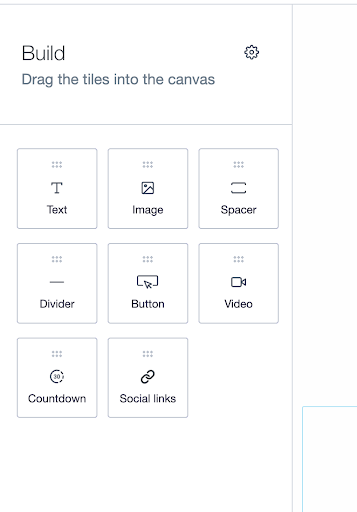
P.S. Campaign Monitor’s drag-and-drop email builder and responsive templates make professional design accessible to small businesses without design experience. Their auto-branded templates can even generate designs that reflect your brand’s logo, fonts, and colors just by entering your website URL.

Read Next:
The Small Business Email Marketing Cadence Framework
Determining Your Optimal Email Frequency
Finding the right sending frequency is crucial—too many emails can lead to unsubscribes, while too few can result in disengagement.
Factors affecting sending frequency:
- Industry type and expectations: Retail can send more frequently than professional services
- Seasonality of business: Increase frequency during peak seasons
- Content quality and availability: Only send when you have something valuable to share
- List engagement levels: More engaged lists can receive more frequent emails
- Customer purchase cycle: Match frequency as per the typical time between purchases
The “Value-to-Frequency” ratio principle:
The higher the value of your content, the more frequently you can send. Value can be:
- Educational content that solves problems
- Exclusive offers or discounts
- Entertainment that delights subscribers
- Timely information that helps decision-making
Industry benchmarks for small business email frequency:
| Industry | Recommended Frequency | Notes |
|---|---|---|
| Retail/E-commerce | 1-2 per week | More during sales/holidays |
| Professional Services | 3-4 per month | Focus on thought leadership |
| Restaurants/Food | 1 per week | Feature specials, events |
| Nonprofit | 1-2 per month | Include fundraising appeals |
| B2B | 2-4 per month | Educational content focus |
Signs you’re sending too often:
- Rising unsubscribe rates
- Declining open rates
- Negative feedback from subscribers
Signs you’re not sending enough:
- Subscribers forget they signed up
- Inconsistent revenue from email
- Competitors are more present in inboxes
Read Next:
The Small Business Email Calendar Template
Planning your email content in advance ensures consistency and reduces last-minute stress.
Monthly planning framework:
- Core campaigns: Plan these first (product launches, major promotions)
- Regular newsletters: Schedule consistent sending days
- Automated sequences: Review and update as needed
- Seasonal content: Align with holidays
- Gap fillers: Keep a bank of evergreen content ready
Balance promotional and value-add content:
Follow the 80/20 rule—80% value-add content, 20% promotional content.
Value-add content ideas:
- How-to guides related to your products
- Industry news and trends
- Customer success stories
- Behind-the-scenes looks at your business
- Expert interviews or Q&As
Seasonal considerations:
Plan content for:
- Major shopping days (Black Friday, Cyber Monday)
- Seasonal changes relevant to your business
- Annual industry events or conferences
- National/international awareness days related to your field
Resource allocation for small teams:
For time-strapped small business owners:
- Batch create content monthly
- Repurpose content across channels
- Use templates to speed up creation
- Consider outsourcing email design or copywriting
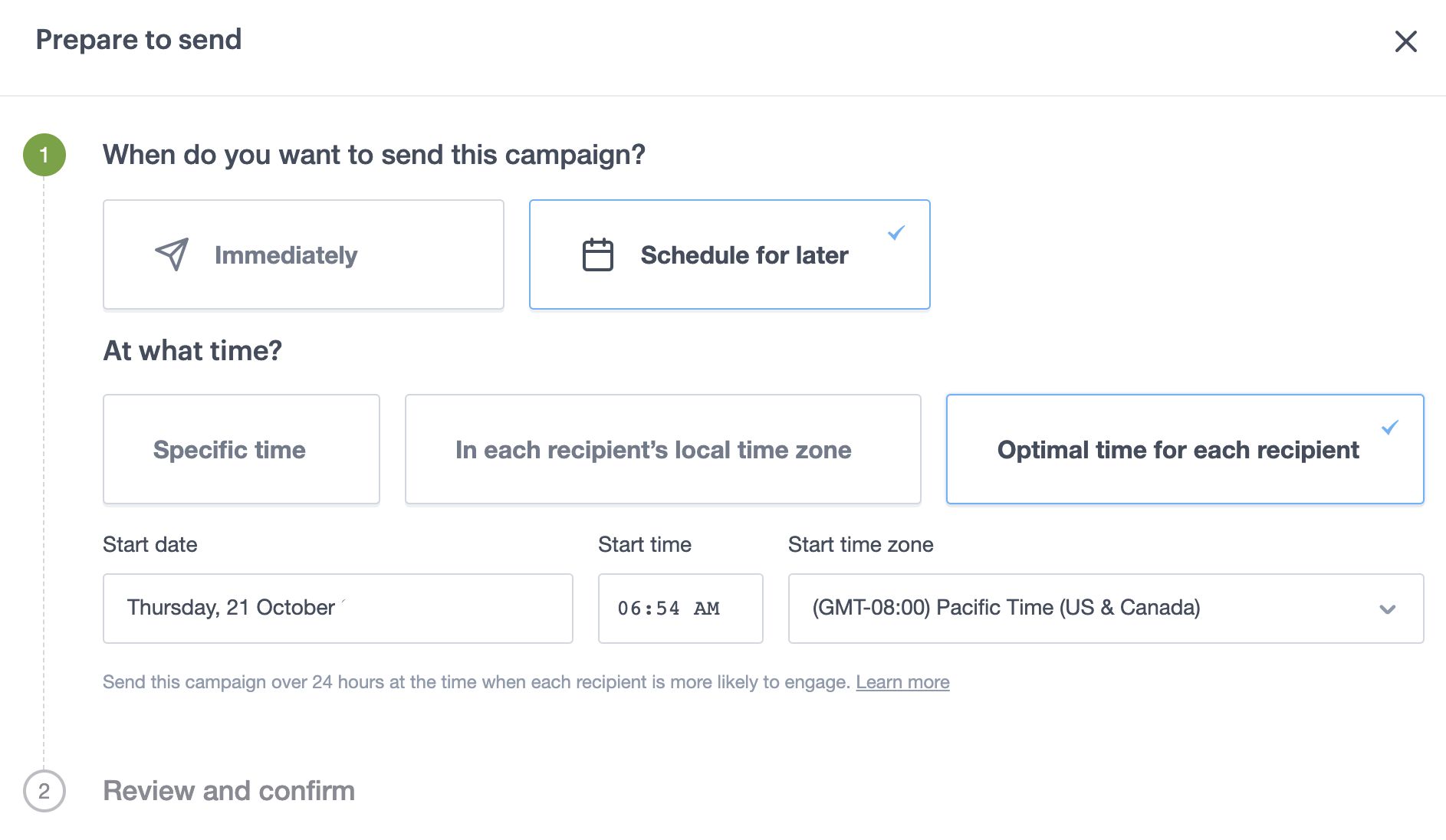
With Campaign Monitor, you can schedule your campaign to maintain a consistent sending pattern even when you’re busy with other aspects of your business.

Read Next: 5 Email Marketing Calendar Templates to Kickstart Your Campaign
Setting Up Your First Automated Campaign
Automation is where email marketing truly shines for small businesses and advanced email marketers—it lets you deliver the right message at the right time without manual intervention.
Step-by-step guidance:
1. Choose your trigger: What action should initiate the sequence?
- New subscriber
- Purchase completion
- Abandoned cart
- Website behavior (page visit, download)
- Date-based (birthday, anniversary)
2. Map your customer journey: Outline the path you want subscribers to take
- What information do they need at each stage?
- What objections might they have?
- What action do you want them to take?
3. Create your emails: Build each email in the sequence
- Write compelling subject lines
- Craft engaging content
- Include clear calls-to-action
- Design mobile-responsive templates
4. Set timing between emails: Determine optimal spacing
- Consider the customer’s decision-making timeline
- Test different intervals to find what works best
- Avoid overwhelming subscribers with too many emails at once
5. Add conditional logic (if available): Create branching paths based on subscriber behavior
- If opened but didn’t click → Send follow-up
- If clicked but didn’t purchase → Send incentive
- If purchased → Move to post-purchase sequence
6. Test before launching: Send test emails to yourself and team members
- Check for broken links
- Verify that all personalization works correctly
- Test on multiple devices and email clients
Timing considerations:
- Welcome emails: Send immediately after signup
- Nurture sequences: Space 2-3 days apart
- Abandoned cart reminders: First within 1 hour, follow-ups at 24 and 48 hours
- Post-purchase: Confirmation immediate, follow-ups based on delivery/usage timeline
Performance measurement:
Track these metrics to evaluate and improve your automated campaigns:
- Open rate: Are your subject lines compelling?
- Click-through rate: Is your content engaging?
- Conversion rate: Are subscribers taking the desired action?
- Revenue generated: What’s the ROI of your campaign?
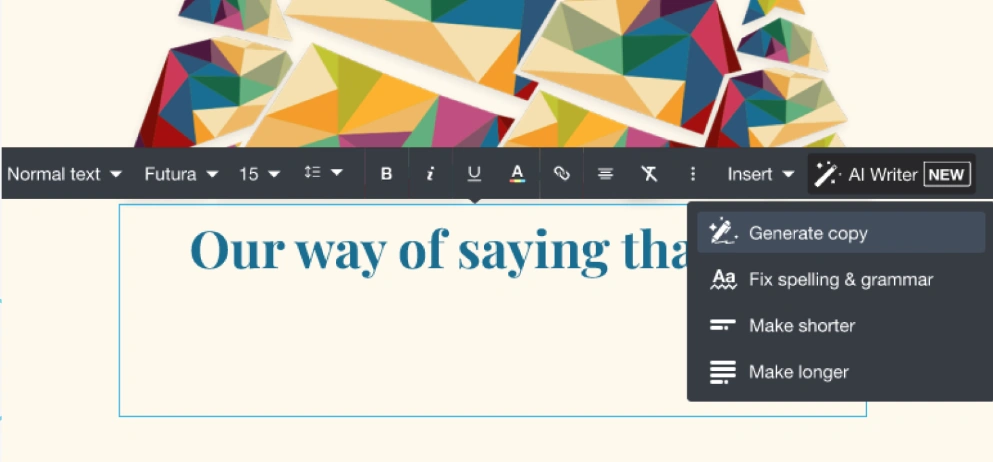
Struggling with creating compelling copy for your campaigns? Campaign Monitor’s AI Writer can help. Whether you’re brainstorming ideas for a new subscriber welcome or optimizing CTAs for higher conversions, AI Writer makes it easy. It transforms long text into bite-sized captions and adapts your messaging for new audiences, giving you more time to focus on refining your email marketing strategy.

Read Next: How to Grow Your Business with Email Marketing Automation
Email Personalization Strategies for Small Businesses
Personalization goes far beyond “Hello [First Name]” and can dramatically improve your email marketing efforts.
- Personalized emails deliver 6x higher transaction rates
- Segmented, personalized, and targeted emails generate 58% of all revenue
Advanced personalization techniques, such as using geolocation and purchase behavior, can significantly enhance the relevance and effectiveness of your emails.
Segmentation based on customer behavior and preferences
Divide your list into targeted groups to deliver more relevant content:
Behavioral segmentation:
- Purchase history: What products have they bought?
- Email engagement: Are they active openers and clickers?
- Website behavior: What pages have they visited?
- Shopping cart activity: Have they abandoned items?
Preference-based segmentation:
- Content interests: What topics do they engage with most?
- Communication frequency: How often do they want to hear from you?
- Product categories: Which types of products do they prefer?
- Purchase motivation: Are they driven by discounts, quality, or convenience?
Implementation example: A small clothing retailer segments their list by:
- Gender (men’s vs. women’s clothing)
- Previous purchases (accessories, outerwear, etc.)
- Average order value (budget vs. premium shoppers)
- Shopping frequency (regular vs. occasional)
Dynamic content based on subscriber data
Dynamic content automatically adapts your email content based on subscriber data:
Examples:
- Show different product recommendations based on past purchases
- Display location-specific offers based on subscriber’s city
- Change messaging based on where subscribers are in the customer journey
Small business application: A local gym could use dynamic content to:
- Show different class schedules based on member preferences
- Feature different trainers based on which classes members attend
- Highlight different membership upgrades based on the current plan
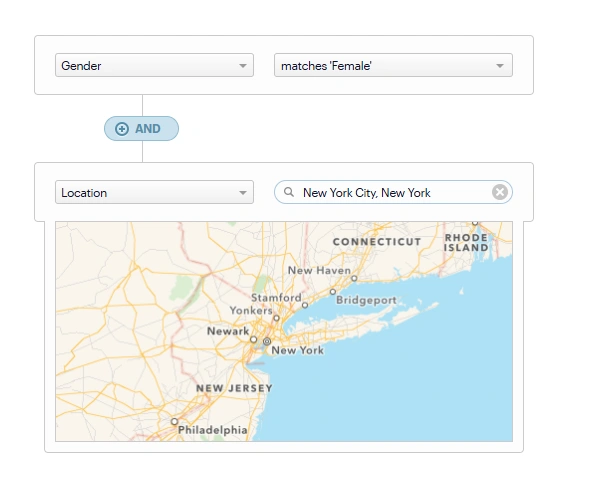
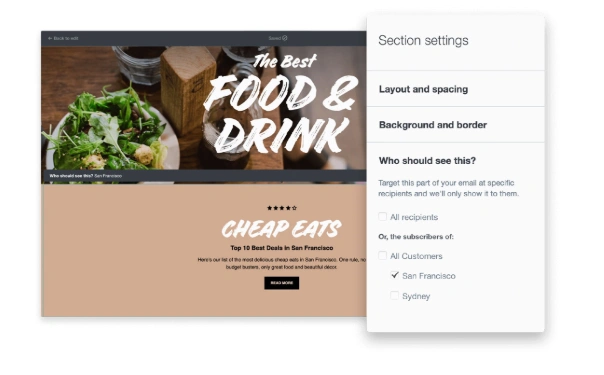
With Campaign Monitor’s Segmentation feature, you can easily target your audience based on specific behaviors and preferences. For instance, you can create a segment for female customers located in New York City. This allows you to send highly relevant content, such as a local event invite or a special offer for New York-based shoppers, ensuring your message resonates with the right audience and drives higher engagement.

Personalized product recommendations
Product recommendations drive significant revenue when done well:
- Recently viewed items: “You were looking at these…”
- Complementary products: “These go great with your recent purchase…”
- Replenishment reminders: “Time to restock your favorite…”
- Customers like you also bought: “People who bought this also liked…”
Campaign Monitor allows you to create dynamic content using customer data to show different content to different subscribers within the same email. This helps create personalized experiences without the need to create multiple campaigns.

Read Next: The Power of Email Personalization to Reach Humans (Not Just Inboxes)
Measuring Email Marketing Success
Understanding your email performance is crucial for continuous improvement.
| Metric | Industry Average | How to improve |
|---|---|---|
| Open rate | 17-28% | A/B test subject lines with strong, personalized hooks. Schedule emails at peak engagement times. |
| Click-through rate (CTR) | 2-5% | Use action-driven CTAs (e.g., “Get Started Now”), and embed buttons in prominent locations. Optimize content for mobile. |
| Conversion rate | 2-5% | Simplify forms, add urgency (e.g., limited-time offers), and ensure smooth post-click experience with optimized landing pages. |
| List growth rate | 1-3% monthly | Implement exit-intent popups, offer exclusive content in exchange for signups, and run targeted ad campaigns to drive traffic to signup pages. |
| Bounce rate | Under 2% | Regularly clean your email list by removing inactive subscribers. Implement a double opt-in process to ensure list quality. |
| Unsubscribe rate | 0.17% | Personalize emails based on behavior and segment lists properly to send more relevant content. Test sending frequency to avoid overwhelming subscribers. |
Campaign Monitor’s live performance dashboards and full engagement reports make tracking these metrics simple for small business owners without technical expertise. Their reporting tools allow you to compare campaigns, track trends over time, and identify opportunities for improvement.
TGI Golf utilized Campaign Monitor’s drag-and-drop builders and analytics dashboards to achieve a whopping 58% average open rate and 21% average click-through rate. With Campaign Monitor’s analytics tools, they gained a comprehensive view of their email performance, such as the following email, which saw a 42.23% open rate, an impressive 23% above the industry average:


Setting realistic benchmarks for small businesses
Industry benchmarks are useful starting points, but your own historical data is more valuable. Track your performance over time to establish your personal benchmarks.
Factors affecting benchmarks:
- Industry (B2B typically has lower engagement than B2C)
- List size (smaller lists often have higher engagement)
- List age (newer lists typically have higher engagement)
- Sending frequency (more frequent sends may have lower per-email engagement)
Using data to improve future campaigns
Data should drive your email marketing decisions:
1. Identify patterns: When do subscribers engage most? Which content performs best?
2. Test systematically: Change one element at a time to see what impacts performance
- Subject lines
- Send times
- Content types
- CTAs
- Design elements
3. Apply learnings: Use insights to refine your strategy
- Double down on high-performing content
- Adjust sending frequency based on engagement
- Refine segmentation based on behavior patterns
- Optimize send times for maximum opens
4. Create feedback loops: Survey subscribers about their preferences and adjust accordingly
Read Next:
17 Email Marketing Metrics Every Marketer Needs to Know
What are good open rates, CTRs, & CTORs for email campaigns?
Choosing an Email Marketing Tool for Small Businesses
Selecting the best email marketing service is crucial for success. Here’s what to consider:
Factors to consider when choosing an email platform:
Ease of use
Look for:
- Intuitive drag-and-drop email builders
- Visual automation workflows
- Pre-designed templates
- Clear analytics dashboards
Template options
Quality templates save time and ensure professional results:
- Responsive design (mobile-friendly)
- Industry-specific options
- Customization capabilities
- Branded templates
Automation capabilities
Advanced automation features include:
- Welcome sequences
- Abandoned cart reminders
- Birthday/anniversary emails
- Re-engagement campaigns
- Post-purchase follow-ups
Analytics features
Look for platforms that track:
- Open and click rates
- Conversion tracking
- List growth metrics
- Comparative campaign analysis
- Subscriber engagement over time
Integration with other tools
Your email platform should connect with:
- Your website/CMS (WordPress, Shopify, etc.)
- CRM systems
- E-commerce platforms
- Social media channels
- Payment processors
Campaign Monitor advantages for small businesses:
- Easy to use interface accessible to any user
- Responsive templates that look great on all devices
- Auto-branded and customizable email templates that reflect your brand’s colors and fonts
- Advanced segmentation and personalization to target the right audience with tailored content
- AI Copy Assistant to quickly generate ideas and optimize your email content
- Visual journey builder for creating automated sequences
- Live performance dashboards for easy analytics
- 24/7 global support for when you need help
Email Marketing Compliance for Small Businesses
Staying compliant with email regulations isn’t just legal—it builds trust with your audience.
Overview of CAN-SPAM, GDPR, and other regulations
CAN-SPAM Act (US)
- Include your physical address in every email
- Provide a clear unsubscribe method
- Honor opt-out requests within 10 business days
- Use accurate header information and subject lines
Choosing an email marketing solution that includes built-in compliance tools can help you adhere to regulations like CAN-SPAM and GDPR.
GDPR (EU)
- Obtain explicit consent before sending marketing emails
- Document when and how consent was given
- Provide clear privacy information
- Allow easy access to data and right to be forgotten
- Report data breaches within 72 hours
CASL (Canada)
- Obtain express or implied consent before sending
- Identify yourself and anyone you’re sending on behalf of
- Provide easy unsubscribe options
- Honor opt-outs within 10 business days
Permission-based marketing best practices
- Use double opt-in: Send a confirmation email requiring subscribers to verify their subscription
- Be transparent about frequency: Tell subscribers how often they’ll hear from you
- Clearly state what they’re signing up for: Set proper expectations about content
- Never buy email lists: This violates most regulations and damages sender reputation
- Keep consent records: Document when and how people subscribed
Managing unsubscribes properly
- Make unsubscribe links prominent and easy to find
- Don’t require login to unsubscribe
- Complete unsubscribe requests promptly (within 10 days, but immediately is better)
- Offer preference options as an alternative to unsubscribe
- Don’t charge fees or ask for personal information to unsubscribe
Privacy policy requirements
Your privacy policy should clearly explain:
- What information you collect
- How you use that information
- Who you share it with (if anyone)
- How subscribers can access or delete their data
- How you protect their information
- How you handle data breaches
Campaign Monitor’s built-in compliance tools automatically handle many of these requirements, including unsubscribe management, physical address inclusion, and permission tracking.
The 5T Framework for Small Business Email Success
1. Targeting: Building and segmenting the right audience
Implementation tips:
- Create detailed subscriber personas based on your best customers
- Develop segment-specific content strategies
- Use progressive profiling to gather more data over time
- Regularly review and refine segments based on behavior
- Many email marketing services for small businesses, like Campaign Monitor, offer advanced segmentation tools to help you target and engage your audience effectively
2. Timing: Sending at optimal times
Implementation tips:
- Test different days and times for your specific audience
- Consider industry norms (B2B: Tuesday-Thursday mornings; B2C: evenings and weekends)
- Use automation to deliver based on individual behavior
Campaign Monitor allows you to send emails at the optimal time for each recipient. For example, Role Models, a UK-based organization, leveraged Campaign Monitor to build lasting relationships with their audience through email. The Role Models team discovered that their audience engages more with early morning sends. This insight allowed them to optimize their email strategy and achieve better results.
3. Testing: Continuous improvement through A/B testing
Implementation tips:
- Test one element at a time for clear results
- Start with high-impact elements (subject lines, CTAs)
- Apply learnings to future campaigns
4. Tracking: Measuring what matters
Implementation tips:
- Focus on metrics that align with business goals
- Set up conversion tracking to measure ROI
- Create custom reports for different stakeholders
- Review trends over time, not just individual campaigns
5. Trust: Building credibility and relationships
Implementation tips:
- Deliver on promises made during signup
- Maintain consistent branding across all touchpoints
- Provide valuable content that solves problems
- Be transparent about data usage and business practices
This framework synthesizes best practices into an actionable system specifically designed for resource-constrained small businesses.
Meet Campaign Monitor - The Email Marketing Tool that Scales with Your Small Business.
Small business email marketing isn’t about copying what large corporations do with smaller budgets. It’s about leveraging your unique advantages—personal connection, authentic storytelling, and agility—to create email experiences that build lasting customer relationships.
The strategies in this guide have been tested and proven by small businesses across industries:
- Build a quality list through ethical, permission-based methods
- Create automated sequences that nurture leads and customers
- Personalize beyond names with segmentation and dynamic content
- Design mobile-first emails that look great on any device
- Test and optimize based on real performance data
Campaign Monitor provides small businesses with the tools to implement all these strategies through an intuitive platform that grows with your business. From drag-and-drop email creation to powerful automation and analytics, it’s designed to help small businesses compete effectively in the digital landscape.
Start small, measure results, and scale what works. Your inbox is waiting.
Read Next:
- How Monica Vinader Increased Subscriptions by 80% using Campaign Monitor
- How Campaign Monitor Helped Girls Who Code Achieve a 150% Increase in Applications