Engage your audience at scale.
Improve open and click rates, reduce unsubscribes, and drive customer loyalty using the power of personalization through segmentation.
Get started → Request a demo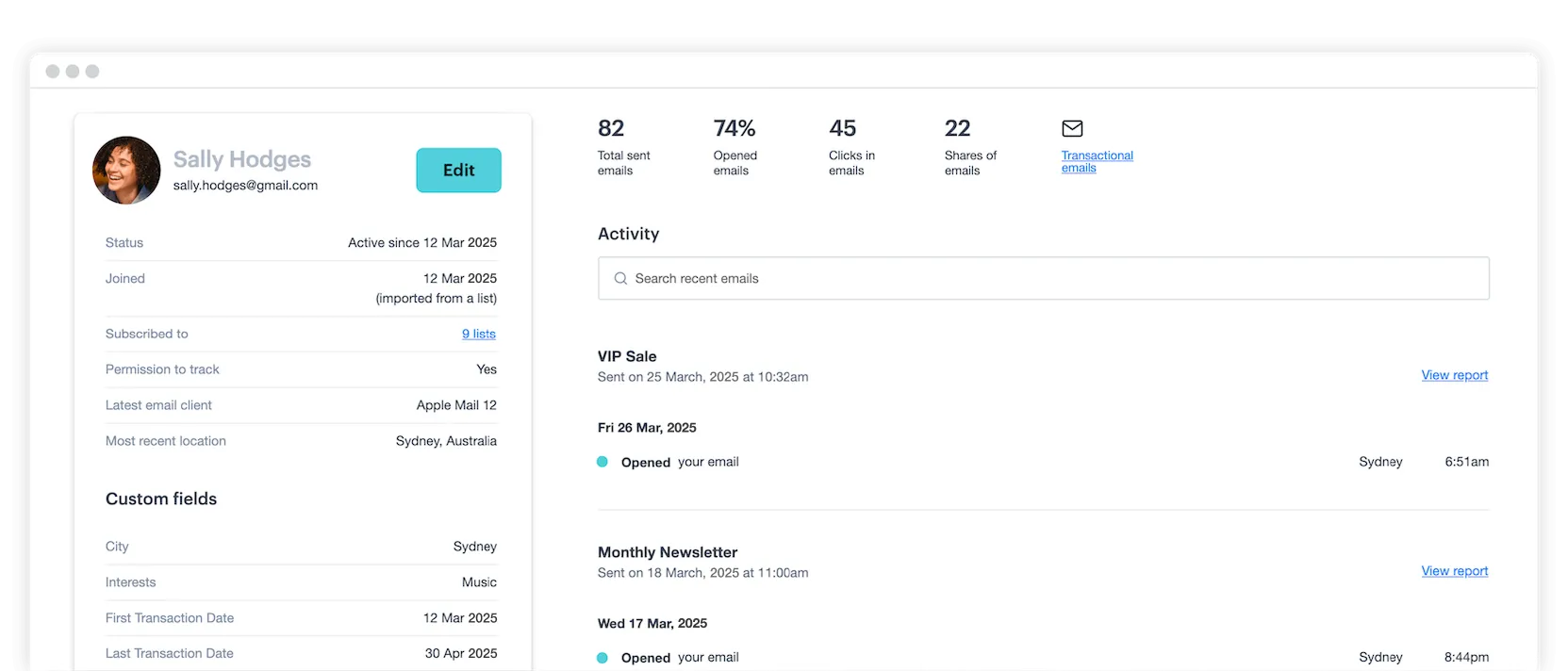
Improve open and click rates, reduce unsubscribes, and drive customer loyalty using the power of personalization through segmentation.
Get started → Request a demo Create custom data fields like location, interests, or gender to make your campaigns more relevant—plus, connect with APIs to enhance your data across platforms.
Identify areas of interest, then craft content that speaks to each audience member on a personal level—driving better engagement and brand loyalty over time.
Engage and convert each of your subscribers with segmentation—get all the tools and guidance you’ll need to captivate your audience with confidence.
Find answers to the most common questions about email segmentation and how it works in Campaign Monitor.
Email list segmentation is the practice of dividing your main email list into smaller, more focused subgroups. These groups are created based on shared characteristics, such as location, interests or purchase history. Instead of sending the same message to everyone, segmentation lets you tailor your communication to each group.
For example, you can send an announcement about a new men’s product only to your male subscribers. This method makes your emails more relevant and valuable to your audience, which can lead to higher engagement and a stronger connection with your brand. The core idea is to send the right message to the right people at the right time.
Campaign Monitor gives marketers several ways to build and act on audience segments. The platform integrates with other business systems, such as your CRM or e-commerce store, allowing you to pull in rich customer data to build your segments.
Custom data fields let you capture subscriber information specific to your business, such as location, interests or other relevant attributes, and use that data to filter your list into targeted groups. Engagement segments automatically categorize your subscribers by activity level, so you can tailor your approach to each group.

Segment Mapper takes segmentation further by letting you describe the audience you want to reach in plain language. The tool generates precise, data-driven segment suggestions based on best practices, which you can apply to campaigns in minutes. Prebuilt automated journeys and A/B testing round out the toolkit, giving you ways to act on your segments with personalized, well-tested campaigns.
Campaign Monitor supports segmentation across a range of subscriber data types. Location, interests, age and gender are common starting points, and custom data fields let you capture any additional information relevant to your business and audience.
Engagement data is another valuable segmentation layer. Campaign Monitor’s engagement segments automatically categorize subscribers based on how actively they interact with your campaigns, making it straightforward to identify your most engaged contacts and those who may benefit from a re-engagement campaign.
You can also connect Campaign Monitor to external platforms, such as customer details from Salesforce or purchase history from Shopify, bringing in customer data from the tools your business already uses. Together, these data sources give you a detailed, multidimensional view of your subscribers, enabling you to build segments that are both precise and actionable.
Segment Mapper is Campaign Monitor’s AI-powered segmentation tool that lets you build precise audience segments using plain-language prompts. You select a subscriber list, describe the audience you want to reach in the prompter, and the tool generates data-driven segment suggestions based on best practices you can review and apply to your campaigns in minutes.
The entire process happens in just a few clicks, making sophisticated segmentation accessible to marketers at any level of technical experience.
Segmentation lets you send personalized, timely messages at each stage of the customer journey, matching your content to where each subscriber is and what they’re most likely to find relevant at that point.
Campaign Monitor’s prebuilt automated journeys work with your segments to deliver targeted emails based on subscriber behavior and triggers. You review, refine and activate these journeys for the right audience groups, so the right message reaches each subscriber at the right moment. Engagement segments also play a role in journey management, letting you identify active subscribers progressing through a journey and separately address those who may benefit from re-engagement.
Campaign Monitor’s segmentation integrates with its automation features, letting you trigger personalized emails for specific audience groups based on subscriber behavior and data. When a subscriber meets the criteria for a segment, the relevant automated journey activates and sends timely content matched to their profile.
Campaign Monitor’s prebuilt automated journeys are built with segmentation in mind. You define the audience for each journey using your segment criteria, and the platform handles delivery based on the triggers you set. Engagement segments work particularly well in automated flows, letting you send one sequence to active subscribers and a separate re-engagement campaign to contacts who have become less responsive. The more precise your segmentation, the more targeted your automation becomes, and each subscriber receives a flow that reflects their behavior and interests.
A good email segment is a group of subscribers who are similar enough to respond positively to a specific, targeted message. The first quality of a good segment is that it is clearly defined and based on reliable data. It should also be large enough to be worth targeting with a custom campaign. Most importantly, a good segment is actionable. It should give you a clear idea of what kind of content or offer would be most relevant to that group.
For example, a segment of subscribers who have previously purchased hiking boots is a great audience for an email about new hiking socks. The ultimate goal is to create segments that allow you to be more helpful and relevant to your audience.
Get powerful tools designed to deliver maximum impact to your business—with click-of-a-button simplicity built right in.
Try it for free