In the competitive world of retail, connecting with customers is everything. Email marketing stands out as one of the most powerful tools in your arsenal.
But, creating effective retail email marketing campaigns isn’t just about blasting promotional messages. It’s about crafting personalized experiences that drive engagement, build loyalty, and ultimately boost your bottom line.
This guide shares how to:
- Set Automated Emails that are triggered as per subscriber’s actions. No manual work needed!
- Use RFM analysis (Recency, Frequency, Monetary value) to identify your VIPs, at-risk customers, and potential loyalists
- Make your emails work harder with dynamic content that changes based on customer preferences and behavior
TL;DR
- Welcome Series: Kickstart engagement with a personalized first-purchase offer. (immediately)
- Nurture Sequence: Solve customer pain points and share a limited-time 10% off. (Days 3-16)
- Abandoned Cart Recovery: Send reminders 1-2 hours, 24 hours, and 48 hours after abandonment
- Post-Purchase Sequence: Share usage tips, reviews, and personalized recommendations.
- Re-Engagement Campaign: Reignite interest with offers or new arrivals for dormant customers.
- Behavioral Trigger Emails: Respond to actions like wishlist with tailored product recommendations
- Promotional Sequence: Create urgency for sales with teasers, early access, and final reminders
- VIP & Loyalty Emails: Share discounts after tier upgrades to celebrate milestones.
- Seasonal Campaigns: Boost holiday sales with curated gift guides and last-minute solutions.
- Review Request Emails: Drive reviews by offering a 10% discount for feedback.


10 Retail Email Marketing Campaigns that Drive Massive Revenue
Let’s explore specific email types that drive results for retail businesses.
#1) Welcome Series (3-4 emails)
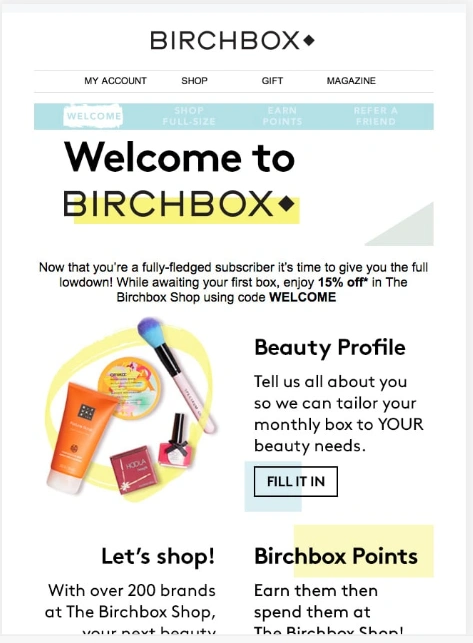

The welcome series introduces new subscribers to your brand and encourages first purchase.
| Content Focus | Timing |
|---|---|
| Welcome & brand introduction with offer | Immediate |
| Product categories & bestsellers | Day 2 |
| Customer benefits (free shipping, returns) | Day 4 |
| Social proof & community | Day 7 |
#2) Nurture Sequence (4-7 emails)


Source: ReallyGoodEmails (https://files.reallygoodemails.com/emails/5-star-reviews.png)
The nurture sequence builds trust and positions your business as the solution to your subscriber’s problems.
| Content Focus | Timing |
|---|---|
| Acknowledge pain points | Day 3 after welcome |
| Explain how your product addresses their specific problem | Day 5 |
| Share reviews | Day 8 |
| Introduce your product with a small incentive (e.g., “10% off your first order”) | Day 10 |
| Address common queries/concerns | Day 12 |
| Present your main offer (e.g., “Buy one, get one free on all products”) | Day 14 |
| Create urgency with a limited-time deal (e.g., “Offer ends in 48 hours!”) | Day 16 |
#3) Abandoned Cart Recovery (3-4 emails)

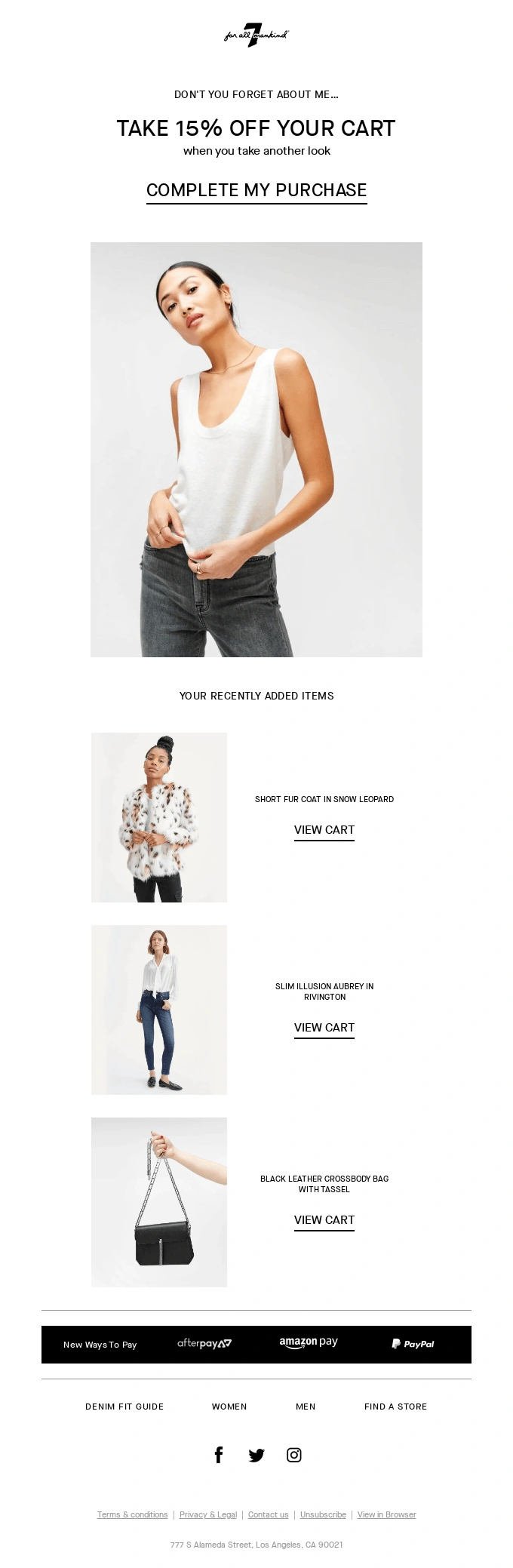
source: ReallyGoodEmails (https://files.reallygoodemails.com/emails/your-bag-is-full-get-your-favorites.png)
Cart abandonment is a significant challenge for retailers, with average abandonment rates sitting at 70%.
| Content Focus | Timing |
|---|---|
| Friendly reminder with cart contents | 1-2 hours after abandonment |
| Product benefits, reviews, FAQs | 24 hours after Email 1 |
| Incentive to complete purchase (if needed) | 48 hours after Email 2 |
| Add urgency, like your offer expires in 24 hours | 24 hours after Email 3 |
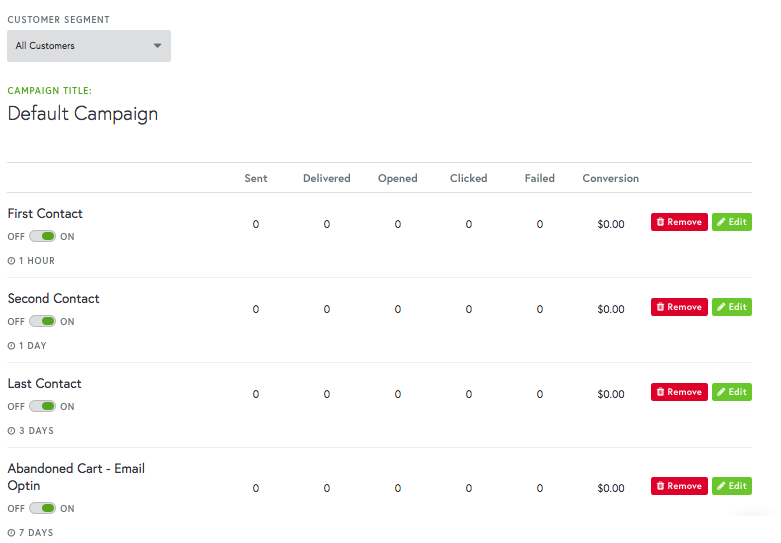
Use Campaign Monitor to set up an automated abandoned cart journey to create abandoned cart workflows that automatically send follow-up emails after a specified time, like 1 hour or 1 day, to remind customers about their abandoned items.

#4) Post-Purchase Sequence (3-5 emails)
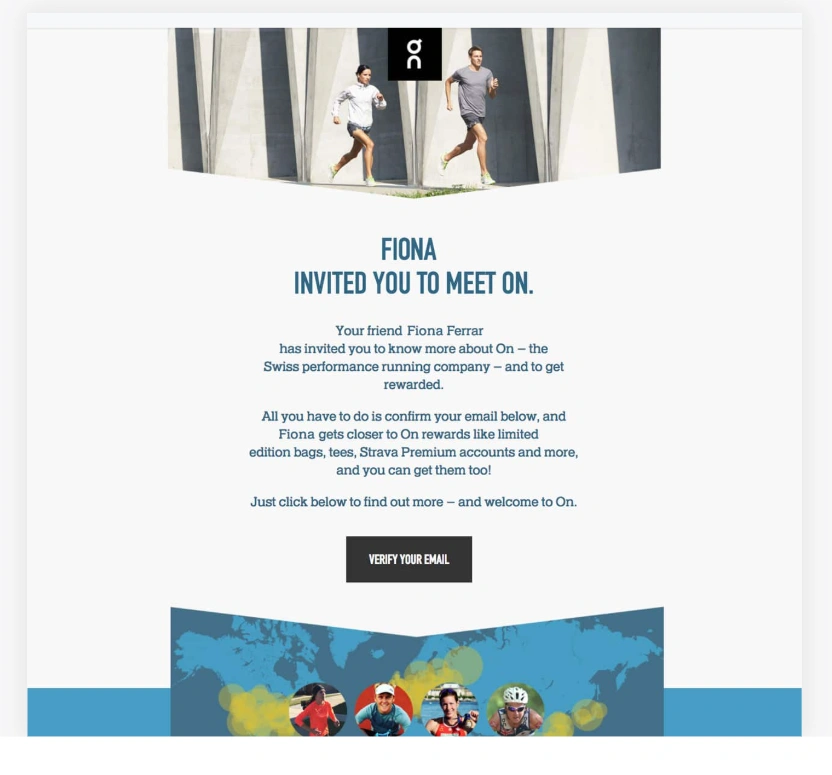

The customer journey doesn’t end at purchase—it’s just beginning. Post-purchase emails build loyalty and encourage repeat business.
| Content Focus | Timing |
|---|---|
| Order confirmation | Immediate |
| Shipping confirmation with tracking | When shipped |
| Usage tips | 1 day after delivery |
| Review request | 7 days after delivery |
| Related product recommendations | 10-14 days after purchase |
Use Unified Email Builder to design and test Transactional emails that are also mobile-ready and brand-aligned. Include personalized product recommendations based on purchase history to encourage additional purchases.


#5) Re-Engagement Campaign (3-4 emails)

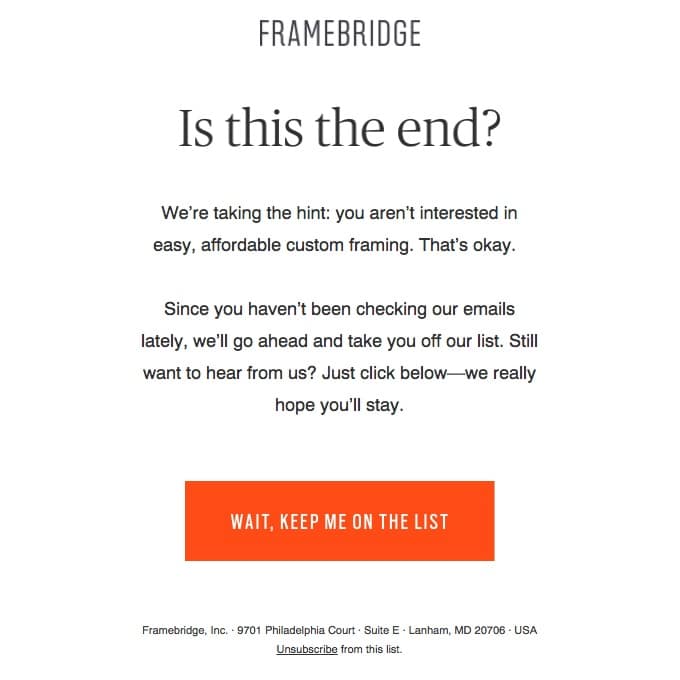
Source: ReallyGoodEmails (https://reallygoodemails.com/behavioral/retention/goodbyes-are-hard)
Re-engagement campaigns win back customers who haven’t purchased in a while.
| Content Focus | Timing |
|---|---|
| “We miss you” with new products/collections | 60-90 days after last purchase |
| Special offer to return like, “$20 off on your next purchase” | 7 days after Email 1 |
| Offer reminder + feedback request | 5 days after Email 2 |
| Final reminder with urgency, “only 24 hours left.” | 4-5 days after email 3 |
#6) Behavioral Trigger Emails

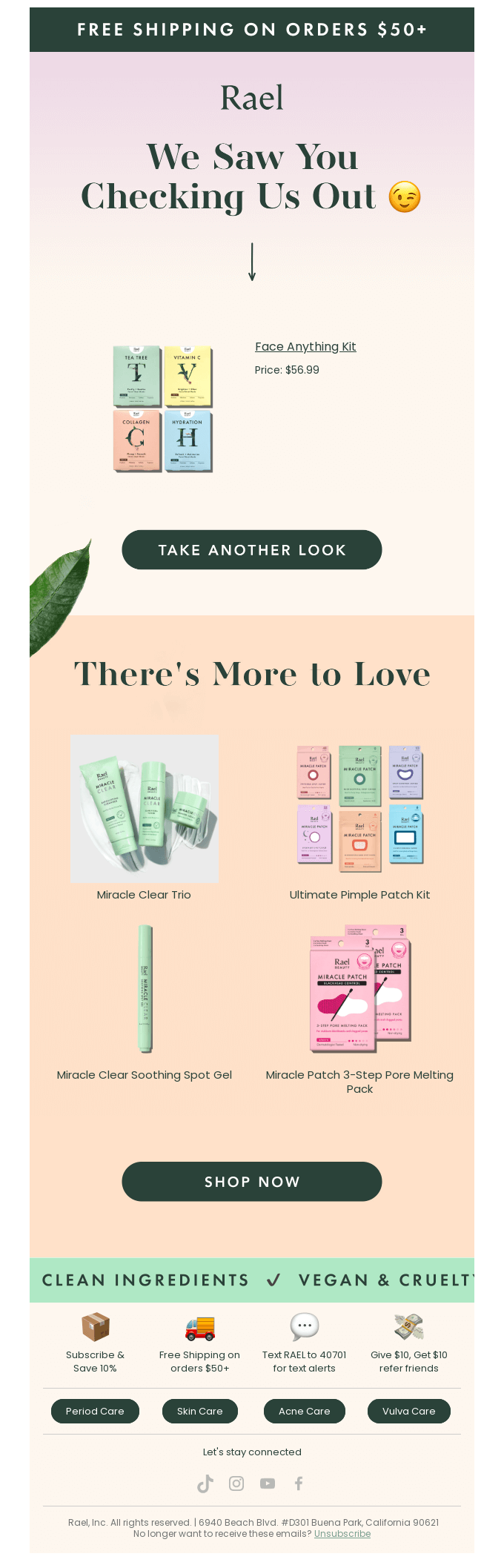
Source: ReallyGoodEmails (https://files.reallygoodemails.com/emails/we-noticed-you-noticing-us.png)
Behavioral trigger emails respond to specific customer actions with timely, relevant messages that guide them toward purchase. These automated emails deliver personalized content based on how customers interact with your store, resulting in higher engagement and conversion rates.
| Customer Behavior | When to Send | Email Content Example |
|---|---|---|
| Product Browse | 24-48 hours after browse | “Still thinking about these items?” with viewed products and similar recommendations |
| Wishlist Addition | 48 hours after addition | “The items you saved are waiting” with stock levels and “Shop now before they’re gone” |
| Review Submission | Immediately after review | “Thanks for your feedback! Here’s 10% off your next purchase” with personalized recommendations |
| Loyalty Tier Achievement | Same day as the achievement | “Congratulations! You’re now a Gold member” with details on new benefits and exclusive offers |
#7) Promotional Email Sequence


A promotional email sequence strategically builds excitement and urgency around your retail sales events or product launches. This sequence typically starts with an announcement, builds momentum with reminders, and creates final urgency to drive conversions before the promotion ends.
| Timing | Content Focus |
|---|---|
| 7-10 days before launch/promotion | Teaser/announcement of upcoming sale or product launch |
| 1-3 days before launch/promotion | Early access invitation for loyal customers with countdown |
| Day of launch | Official launch with featured products and main offer details |
| Midway through promotion/launch | Bestselling items and social proof (“Customers are loving…”) |
| 24-48 hours before Sale ends | Final reminder with urgency (“Ending soon” or “Last chance”) |
#8) VIP and Loyalty Program Emails


Source: Pinterest (https://www.pinterest.com/pin/193021534025281982/)
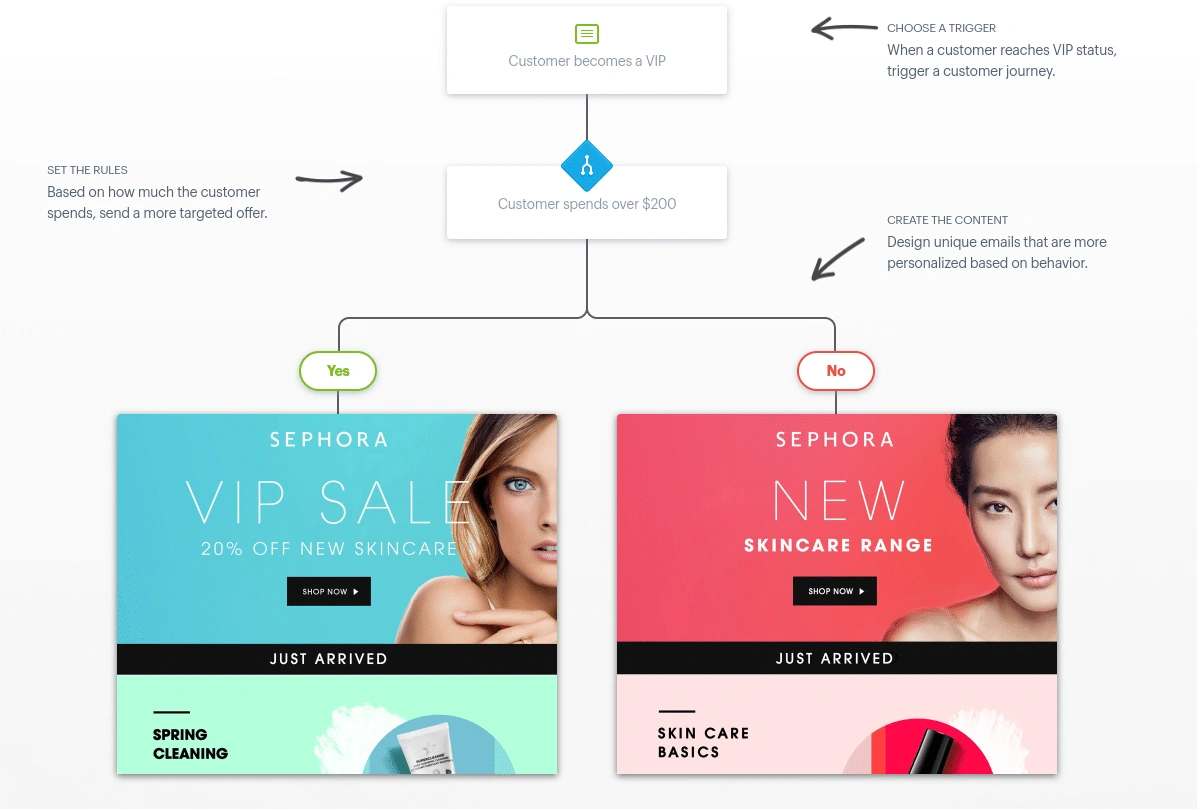
Customer loyalty program emails keep your most valuable customers engaged and incentivize continued purchases. These targeted communications celebrate customer milestones, remind members of available rewards, and provide exclusive benefits that make customers feel valued and recognized for their ongoing support.
| Email Type | Timing | Key Elements |
|---|---|---|
| Welcome to Loyalty | Immediately after enrollment | Tier structure, point system explanation, first reward |
| Points Update | Monthly or after purchase | Points earned, points needed for next reward, expiration dates |
| Tier Advancement | When customer reaches new tier | Congratulations message, exclusive new perks, how to maintain status |
| Reward Available | When points threshold is reached | Available rewards, how to redeem, expiration reminder |
| VIP-Exclusive Offer | Quarterly or for special events | Early access, exclusive products |
Use Campaign Monitor’s journey builder to create a personalized loyalty journey. From notifying customers when they’re close to earning a reward to sending special offers when they reach reward thresholds, you can keep them engaged and motivated to keep coming back.

#9) Seasonal and Special Promotions
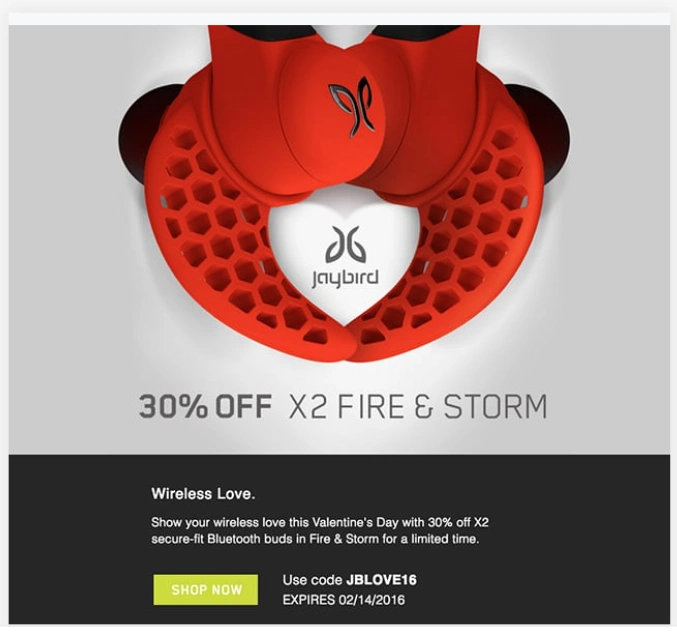

Effective seasonal campaigns go beyond simply announcing sales—they create emotional connections through storytelling, solve customer problems (like gift-giving challenges), and provide genuine value through curated selections and timely information.
| Season/Holiday | Timing | Email Strategy | Key Content Elements |
|---|---|---|---|
| Black Friday/Cyber Monday | 2-3 weeks before event | Teaser → Early access → Main event → Extended offers | Doorbusters, countdown timers, limited quantities, exclusive online vs. in-store offers |
| Christmas/Holiday | Early November through December | Gift guides → Shipping deadlines → Last-minute solutions | Curated gift collections, shipping guarantees, gift cards, in-store pickup options |
| Valentine’s Day | 3 weeks before | Gift ideas for different relationship stages | Categories, experience gifts, self-care options, reservation reminders |
| Back to School | Mid-July through August | Grade-specific guides → Essentials → Last-minute needs | Age-appropriate supplies, dorm essentials, first-day outfits, tech recommendations |
| Spring/Summer Transition | 4-6 weeks before season | Preview → New collection → Seasonal essentials | Lookbooks, outfit inspiration, vacation must-haves, seasonal color trends |
| Fall/Winter Transition | 4-6 weeks before season | Preview → Cold weather essentials → Holiday prep | Layering guides, home coziness items, early gift shopping suggestions |
| Store Anniversary | 2-3 weeks before date | Teaser → VIP early access → Public celebration | Customer appreciation offers, limited edition items, in-store events, brand storytelling |
| Birthday | 1-week before | Offer → Reminder to use the discount | Special gift offers, unique discount codes, personalized birthday greetings |
#10) Review Request Emails


Source: ReallyGoodEmails (https://reallygoodemails.com/emails/day-30-what-s-happened-so-far)
Review request emails help build social proof while gathering valuable customer feedback. When properly timed and incentivized, these emails can significantly increase review submission rates while making customers feel their opinions are valued, strengthening their connection to your brand.
| Email Type | Timing | Content Focus | Key Elements |
|---|---|---|---|
| Initial Request | 7-14 days after delivery | Friendly review invitation | Product image, direct review link, simple rating options |
| Thank You/Incentive | Immediately after review submission | Appreciation and reward | Genuine thanks, discount code for next purchase, UGC permission request |
| Follow-up (if no response) | 3-5 days after initial request | Gentle reminder | Alternative feedback options, importance of customer opinions |
| Review Showcase | After publishing | Celebration of customer’s contribution | Where their review appears, social sharing options, related products |
| Feedback Implementation | When applicable | How feedback improved products | “You spoke, we listened” messaging, product improvements based on reviews |
Read Next:
11 Steps to Getting Started with Email Marketing for Your Retail Store
Successful retail email marketing starts with building a solid foundation. Let’s explore the essential first steps to launch your retail email marketing strategy.
#1) Setting Clear Goals and KPIs
Define what success looks like for your email campaigns:
- Revenue Generation: Direct sales attributed to email campaigns
- Customer Retention: Repeat purchase rate from email subscribers
- Engagement: Open rates, click-through rates, and time spent with emails
- List Growth: New subscriber acquisition rate and list quality
#2) Understanding Your Audience
Develop detailed customer personas to guide your email content:
- Demographics: Age, location, income level
- Shopping Behaviors: Online vs. in-store preferences, average order value
- Product Interests: Categories and specific items they engage with
- Communication Preferences: Email frequency and content types they respond to
#3) Choosing the Right Email Marketing Platform
When evaluating email marketing platforms, prioritize these features:
- Visual Email Builder: Look for drag-and-drop functionality with retail-specific templates
- Segmentation Capabilities: The ability to segment based on purchase history and customer behavior
- Automation Tools: Support for triggered emails like abandoned cart recovery and post-purchase sequences
- E-commerce Integration: Seamless connection with your online store and other tools
- Mobile Optimization: Ensuring emails look great on smartphones (where over 60% of emails are opened)
- Analytics: Detailed reporting on open rates, click-through rates, and conversions
Campaign Monitor offers retail-specific features like a drag-and-drop email builder with responsive templates, automation tools, easy segmentation based on purchase behavior, and seamless integration with popular retail platforms like Shopify, WooCommerce, and Salesforce.
#4) Building Your Email List
Before you can send compelling emails, you need people to send them to. Here are effective ways to grow your retail email list:
In-Store Collection Methods
Your physical store offers excellent opportunities to collect email addresses:
- Point-of-Sale (POS) Collection: Train staff to ask for email addresses during checkout, explaining the benefits (like exclusive offers)
- QR Codes: Place QR codes around your store that link to a signup form
- Loyalty Programs: Offer rewards or points in exchange for customer information
- In-Store Events: Collect emails during special events, workshops, or demonstrations
Website Opt-In Strategies
Your online presence should work just as hard at list building:
| Opt-In Type | Best Placement |
|---|---|
| Pop-up Forms | Exit-intent or timed (10-15 seconds) |
| Header/Footer Forms | Persistent across all pages |
| Landing Pages | Dedicated signup pages |
| Content Upgrades | Within blog posts or product pages |
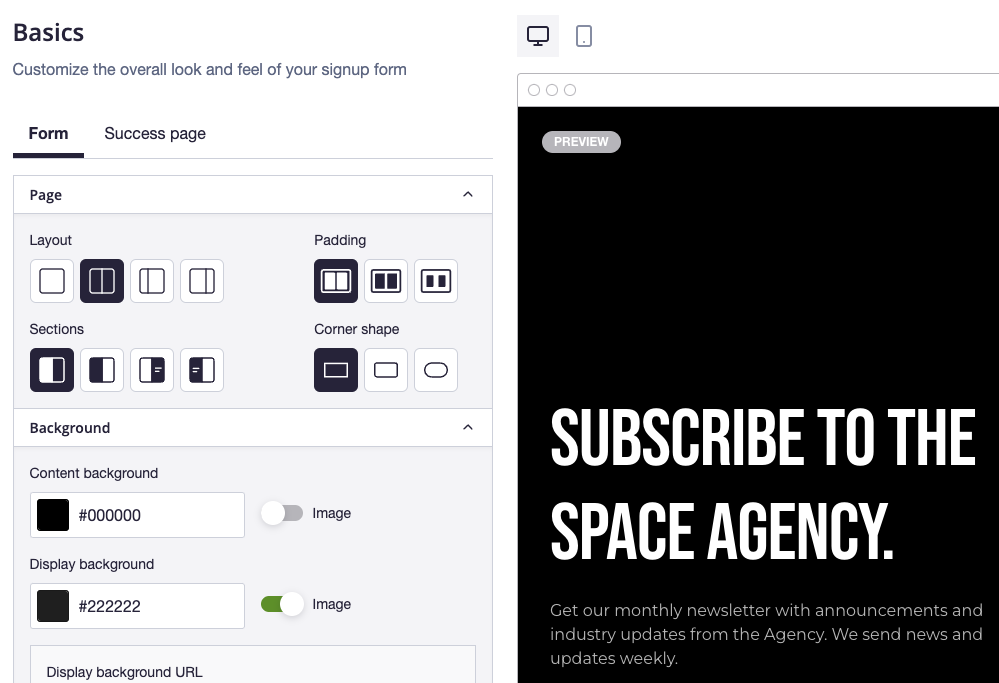
Campaign Monitor’s custom form builder allows you to create responsive, branded signup forms that integrate seamlessly with your website design. You can create different form types—from subtle pop-ups to embedded forms—and A/B test their messaging to maximize conversions. For example, you might test whether a pop-up offering a free e-book converts better than an inline form promising weekly industry insights.

#5) Planning Your Email Calendar
Create a strategic calendar that aligns with retail seasons and customer needs:
| Month | Retail Focus | Email Campaign Ideas |
|---|---|---|
| January | Post-Holiday Sales | Clearance events, new year collections |
| February | Valentine’s Day | Gift guides, couple-focused promotions |
| April | Spring Season | New arrivals, spring lookbooks |
| July | Summer Sales | Seasonal promotions, vacation essentials |
| November | Black Friday/Cyber Monday | Early access, doorbusters, limited-time offers |
| December | Holiday Shopping | Gift guides, shipping deadlines, last-minute deals |
#6) Creating Compelling Email Content
Crafting engaging content is critical to the success of your retail email marketing campaigns. Your content needs to capture attention, communicate value, and drive action—all while representing your brand voice.
Content Types That Drive Retail Results:
- Product Showcases: Highlight new arrivals, bestsellers, or seasonal collections with high-quality images and concise descriptions
- Educational Content: Share styling tips, product care guides, or how-to content that adds value beyond promotion
- Customer Stories: Feature testimonials and user-generated content showing your products in real life
- Behind-the-Scenes: Give subscribers an insider look at your brand, design process, or store preparations
Writing Effective Copy for Retail Emails:
When writing email copy, focus on these key principles:
- Keep paragraphs short (2-3 lines maximum) for easy scanning
- Lead with benefits rather than features (“Perfect for summer adventures” vs. “Made with waterproof material”)
- Create a sense of urgency with time-limited offers or limited stock notifications
- Use action-oriented language in your CTAs (“Shop Now” or “Get 20% Off” rather than “Click Here”)
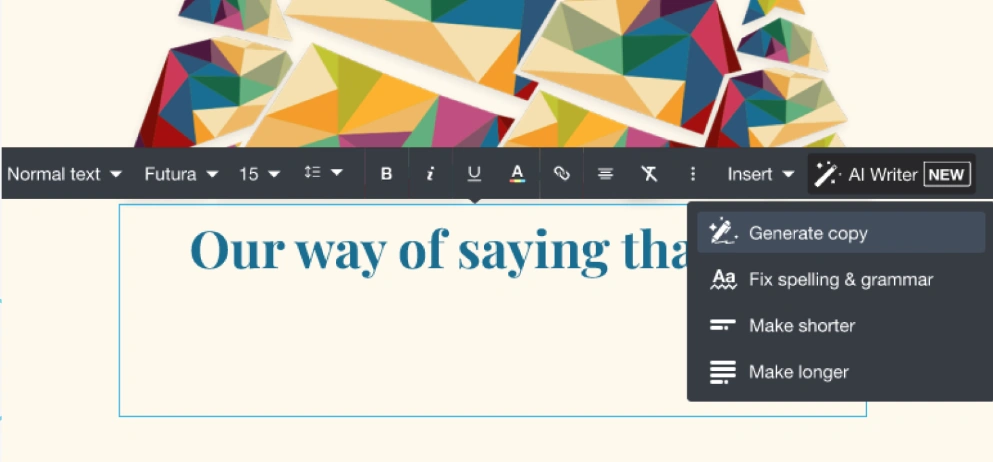
Campaign Monitor’s AI Writer can help you overcome writer’s block and generate compelling content ideas for your retail emails.

#7) Segmenting Audience as You Go
Segmentation can increase revenue by up to 760% compared to one-size-fits-all campaigns. Strategic segmentation allows retailers to deliver content that truly resonates with specific customer groups.
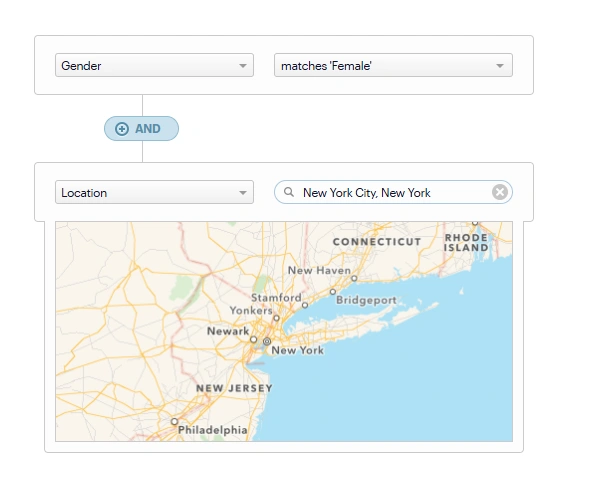
Demographic Segmentation Target customers based on key characteristics:
- Age Groups: Tailor messaging style and product selections by generation
- Location: Localize content based on climate, events, and nearby stores
- Gender: Customize product recommendations
Behavioral Segmentation Craft campaigns based on how customers interact with your brand:
| Segment | Characteristics | Email Strategy |
|---|---|---|
| New Customers | First purchase, exploring | Educational content, brand introduction |
| Loyal Customers | Frequent purchases, high CLV | VIP offers, early access, exclusive content |
| Browsers | Website visits, no purchase | Product highlights, first-purchase incentives |
| Cart Abandoners | Added to cart, no checkout | Recovery emails, limited-time offers |
| Lapsed Customers | No purchase in 3+ months | Re-engagement campaigns, “We miss you” |
RFM Analysis
RFM (Recency, Frequency, Monetary value) analysis is particularly effective for retail:
- Recency: How recently did the customer purchase?
- Frequency: How often do they purchase?
- Monetary Value: How much do they spend?
By combining these factors, you can identify your:
- VIPs: Recent, frequent, high-value customers (send exclusive offers)
- At-Risk: Previously frequent but not recent (send re-engagement campaigns)
- New High-Spenders: Recent, high-value but first-time (send welcome series)
- Potential Loyalists: Recent, frequent but lower value (send upsell campaigns)
Campaign Monitor’s advanced segmentation tools allow retailers to create highly targeted audience segments using any subscriber data like purchase history, age, location, interests.

#8) Making Personalization Your Mission
Personalizing your emails can increase transaction rates by up to 6x.
Product Recommendations Based on Purchase History: Leverage customer data to suggest:
- Complementary products that pair with previous purchases
- Replenishment reminders for consumable products
- More items from categories they’ve shown interest in
- Products matching their demonstrated style preferences
Dynamic Content Based on Customer Preferences Customize email content for each recipient with:
- Weather-based recommendations (like rain gear during rainy seasons)
- Local store information and nearby events
- Content from their preferred product categories
- Recently viewed products they didn’t purchase
#9) Focusing on Mobile-First Design
With 60% of emails now opened on mobile devices, mobile optimization is no more an option—it’s a necessity.
Responsive Email Templates
Ensure your emails look great on all devices:
- Single-column layouts for easier mobile reading
- Larger font sizes (minimum 14px for body text)
- Touch-friendly buttons (minimum 44×44 pixels)
- Compressed images for faster loading
- Preview text that supports your subject line
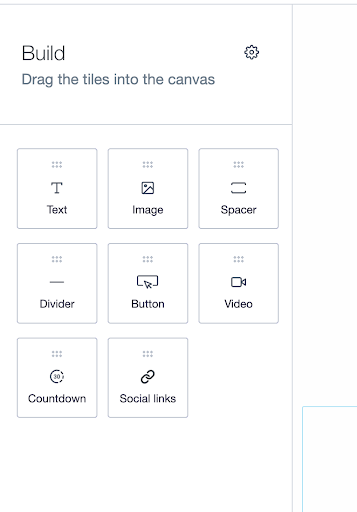
Campaign Monitor offers a library of mobile-optimized templates you can choose from. You can also use the drag-and-drop email builder, which allows you to build professional emails quickly – no coding required.

#10) Measuring Your Email Performance
To continuously improve your email marketing, you need to measure performance and make data-driven decisions.
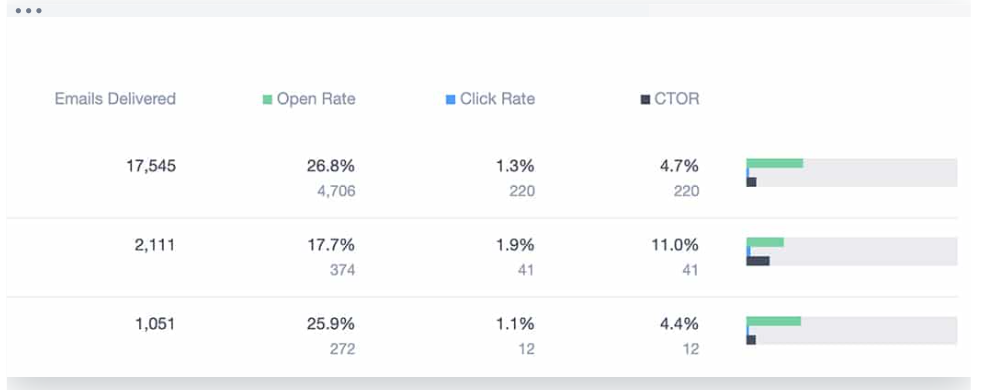
According to Campaign Monitor’s 2022 Email Marketing Benchmarks Report, the table below shows the key email engagement benchmarks for the restaurant, food, and beverage industry. These benchmarks help you understand how well your email campaigns are performing compared to the industry standards.
| Metric | Retail Benchmark | Improvement Strategy |
|---|---|---|
| Open Rate | 17.1% | Optimize subject lines with A/B testing and personalization to boost open rates. |
| Click-Through Rate (CTR) | 0.7% | Use clearer, action-oriented CTAs and test different button placements to increase clicks. |
| Click-to-Open Rates | 5.8% | Refine email content relevance, align CTAs with the offer, and experiment with personalized or dynamic content to boost engagement. |
| Unsubscribe Rate | 0.1% | Regularly clean your list, ensure relevance of content, and optimize email frequency to minimize unsubscribes. |
Campaign Monitor’s analytics provide retail businesses with full engagement reports across all email types, allowing marketers to track performance metrics like opens, clicks, bounces, shares, and unsubscribes to continuously improve their email strategy.

#11) A/B Testing
Systematic A/B testing improves results over time:
Subject Line Testing Strategies
Test these elements in your subject lines:
- Length: Short (30 characters) vs. longer (60+ characters).
- Personalization: Including name vs. no name
- Emojis: With vs. without
- Questions vs. Statements: “Ready for summer?” vs. “Summer styles are here”
- Specificity: “20% Off Everything” vs. “Save on Summer Styles”
Read Next:
Integrating Email with Other Retail Marketing Channels
Email marketing works best when integrated with your other marketing channels.
Email and Social Media Integration
Create synergy between email and social:
- Cross-promote channels in both email and social posts
- Repurpose content across platforms (turn popular emails into social posts)
- Use social proof in emails (customer photos, reviews, UGC)
- Create exclusive content for each channel to encourage users to follow both
- Retarget email subscribers with social ads for multi-touch campaigns
Email and In-Store Experience
Bridge the digital-physical divide:
Connect digital communication to physical experiences:
- Store event invitations sent via email
- Digital receipts with post-purchase recommendations
- In-store exclusive offers delivered via email
- Store opening announcements to local subscribers
- BOPIS (Buy Online, Pick-up In Store) notifications and instructions
Email and SMS for Retail
Combine these powerful channels for maximum impact:
When to Use Each Channel
Strategically deploy email and SMS based on their strengths:
| Channel | Best For | Timing | Example Use |
|---|---|---|---|
| Detailed information, Visual content | Morning/evening | New collection launch with lookbook | |
| SMS | Urgent messages, Time-sensitive offers | Mid-day | Flash sale ending today, Back-in-stock alert |
| Both | Major promotions, Important announcements | Coordinated timing | Black Friday campaign, Store opening |
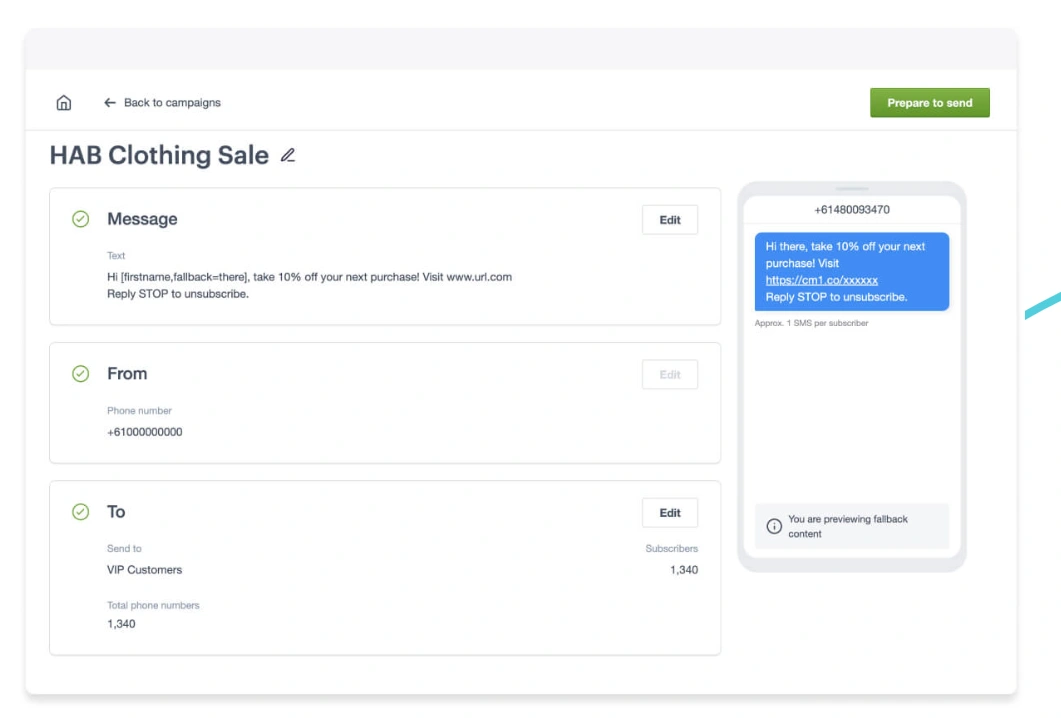
Campaign Monitor offers SMS campaign management integrated with email marketing, allowing retailers to run cohesive cross-channel communications with personalized messages using existing subscriber data for better engagement.

Read Next: The best email integrations to enhance your retail marketing campaigns
Campaign Monitor Makes Email Marketing Work for Your Retail Store
Campaign Monitor offers all the tools retailers need to create engaging, high-converting email campaigns—from mobile-ready templates and powerful segmentation to automation and analytics that help you measure success.
With features specifically designed for retail businesses, Campaign Monitor makes it easy to connect with customers, showcase products, and drive sales through email marketing.
Read Next:
- How GlamCorner Achieved 3000% ROI with Email Marketing Using Campaign Monitor
- 24.51% of Winkelstraat.nl’s conversions are driven by email via Campaign Monitor