5 minute read time
Do Image Maps Work in HTML Email?

Article originally published in November 2007, updated April 2019.
Given current conditions in which images are very often blocked in email messages, image maps seem to be an odd technique to pursue. Because, when your source image is blocked, your links are no longer functional.
HTML Email Image Map Support and Suggestions for 2019
That’s a fundamental accessibility issue. However, the Campaign Monitor team receives frequent inquiries about image maps, so we decided to test them out for people who are curious.
What is an image map?
An image map includes a graphic with a series of code. This code contains special coordinates for links so that clicking on different parts of the image takes you to unique links.
For example, you could take an image that contains multiple plates of food from your restaurant. Clicking on each dish might take the user to unique landing pages designed to list the ingredients of each meal.
When should you use an HTML image map?
Although they can look nice when done right, it takes a long time to design and code an HTML image map when there are so many other options available.
Image maps come with another significant drawback where email marketing is concerned: they aren’t responsive.
Over half of all emails are opened on mobile devices now, so it’s important to design emails that look great on every device and in every email client. Image maps rely on a static set of code for both the image and the links to work in unison. Your email might function as intended on a desktop browser, but, if someone opens it from their phone, the links probably won’t match up in the right places.
There are so many possibilities for incorporating beautiful graphics and links into your email campaigns that there’s really no need to use image maps.
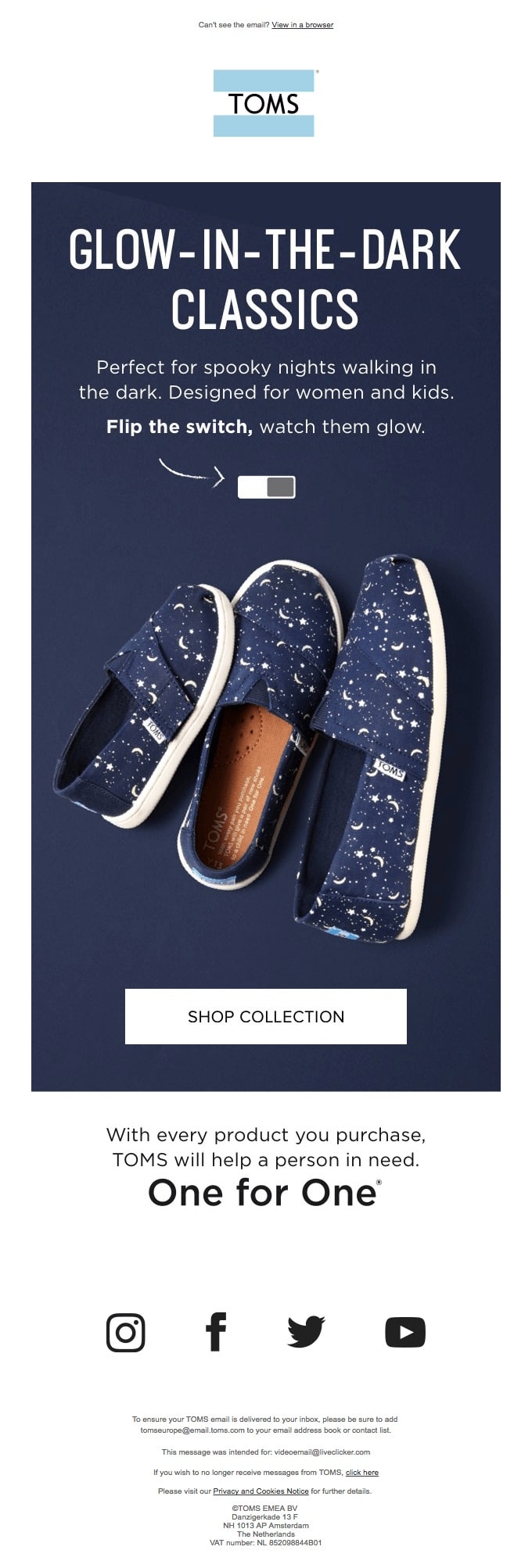
This email from Toms, for example, contains an interactive yet responsive image.
Source: Really Good Emails
If you must use an HTML image map, do your homework to figure out which devices your subscribers use to open emails. Once you have that information, you can design a series of image maps that are specifically coded to function correctly on each email client and device.
HTML email image map support: How do you make an image map?
It’s pretty easy to make an HTML image map with minimal coding knowledge.
You need a static image (the size cannot change at any point once you get started), links to landing pages, and invisible shapes to lay over the image which will contain the links.
The most challenging part is figuring out the coordinates of where to place the link’s invisible shape or click-zone. You can figure this out manually by opening something like Microsoft paint, hovering your mouse over different areas of the image, and jotting down the coordinates. Or you can plug your image into this free generator.
Don’t forget the most crucial aspect of HTML email image map support: testing to make sure your campaign looks perfect with every email client.
What are HTML elements used to make an image map?
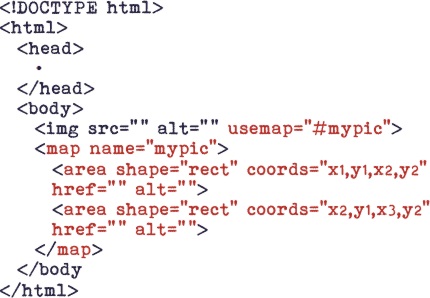
Once you figure out the coordinates, the coding is pretty simple. You’ll just use these three basic elements:
- Img: the URL of the image
- Area: the code for clickable space and shapes
- Map: the link map containing various clickable shapes
Here’s an example of a simple HTML image map from HTML-5-tutorial.
HTML email and image map support: the results
Remarkably, email clients offered good support for image maps. Moreover, what’s more surprising is that many clients retain the functionality of the links, even with images off. Following is a table which exhibits how popular email clients handled the image maps.
| Client | Functions With Images On | Functions With Images Off |
| .Mac | Yes | Yes |
| Yahoo! Mail | Yes | No |
| Yahoo! Mail Classic | Yes | No |
| AOL Webmail | Yes | Yes |
| Gmail | No | No |
| Windows Live Hotmail | Yes | No |
| Apple Mail | Yes | Yes |
| Thunderbird | Yes | Yes |
| Penelope (Eudora 8) | Yes | Yes |
| Outlook 2007 | Yes | Yes |
| Outlook 2003 | Yes | Yes |
| Outlook Express | Yes | Yes |
| Windows Live Mail | Yes | Yes |
| Lotus Notes 8 | Yes | Yes |
| Entourage | Yes | No |
Our recommendation
The results indicate that it’s not a good idea to use image maps. Specifically, because of the following issues:
- The frequency in which images are disabled
- Image maps and their respective images don’t marry well and pose accessibility issues for those visually impaired
- Gmail—a very popular email client—doesn’t support them consistently (they do not work when using Safari)
- They aren’t responsive.
If you really want to try it, do your research on HTML email image map support across different clients and design unique image maps for specific apps.
Are you ready to design stunning emails with images and links that look beautiful on any device? Browse some of our templates to see how Campaign Monitor can level up your email campaigns.