5 minute read time
How to Stop Gmail from Adding a Margin to Your Images
Article first published May 2010, updated May 2019
As a professional or business owner looking to utilize Gmail in your email marketing activities, it’s important to have a relatively deep understanding of how Gmail affects images.
Recently, Gmail has started behaving like Hotmail and Firefox by adding a margin around images. As you can guess, design and layout breakage ensues:
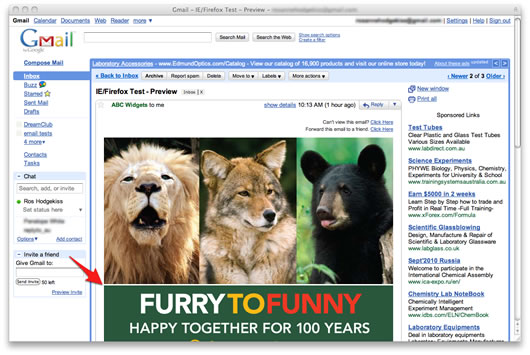
Based on tests, this issue is affecting Gmail when viewed in IE7, Firefox 3.6, Google Chrome 4.1 (Windows), and Safari 4, Firefox 3.5 (Mac). Thankfully, there’s a simple fix.
The solution
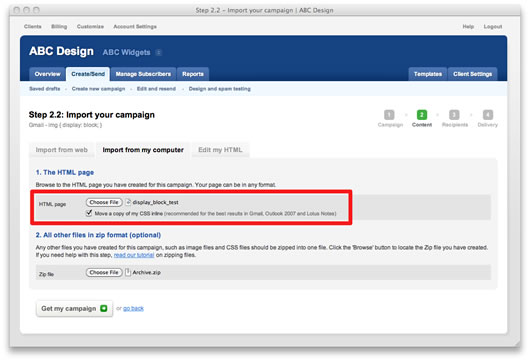
You can fix this issue in all of the above clients by adding img { display: block; } to the <head></head> section of your HTML newsletter code. Campaign Monitor can automatically convert your CSS to inline styles, so once you’ve added this, we’ll do the rest:

Alternately, you can add it directly to your styles like so: <img src="image.jpg" style="display: block;" />.
The result is the same: fixed.
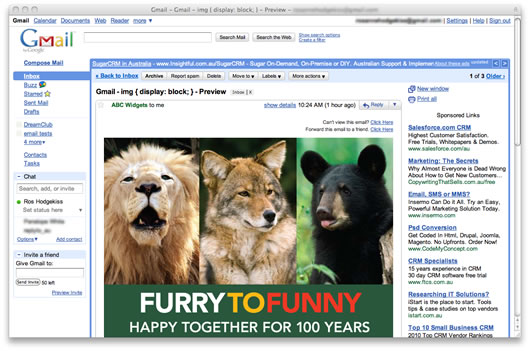
If you or your clients use email templates, this is a good time to give them a check and add img { display: block; }if necessary. You might want to run them through our design and spam tests, just to be certain. By adding this to your styles, you’ll be hitting two birds with one stone by preventing image rendering glitches in both Hotmail/Firefox and Gmail.
Many thanks to the folks on the forums who wrote in about this. Let us know in the comments below if this has affected you or you’ve come across a similar quirk elsewhere.
And don’t forget to test your campaigns.
Why you should always test your emails
Testing your emails is one of the most important practices to exercise in email marketing. Customers using different email platforms, such as Gmail or Outlook, for example, will have different experiences when viewing emails. The disparities can be minor or more catastrophic, like your pictures not showing up.
With Campaign Monitor, you can run some of the most highly recommended tests that’ll evaluate the potential of your marketing emails, and that kind of insight could give you a serious edge over your competition.
Other services include active testing while you build your email. The bottom line is that, with email marketing as competitive as it is, testing your emails is worth the effort.
Does Gmail support HTML emails?
You should know that, from a developer standpoint, creating HTML emails for Gmail can be challenging.
There are more versions of Gmail than you might expect. Not only are there standard desktop and mobile versions in terms of display, but Gmail also has G Suite for businesses and an Android edition that can suffer compatibility problems.
One of the basic rules of using HTML emails on Gmail is that it only allows <style> inside the <head>.
It also doesn’t allow attribute selectors. Many pseudo-classes are also out of play with Gmail.
It’ll also wipe out your style block if an error occurs. That’s one of the major frustrations of making HTML emails on Gmail.
On the bright side, however, you may be relieved to hear that, despite its restrictions, Gmail really does offer a lot of helpful features for making HTML emails on the platform. Gmail even sports a what-you-see-is-what-you-get editor—or WYSIWYG editor—that makes crafting HTML emails with Gmail much easier.
Whenever creating HTML emails on Gmail, always take the CSS margin, HTML margin, and CSS padding, in terms of Gmail margins, into account. When you make proper use of these, you can send great-looking emails like this on Gmail:
Source Campaign Monitor
Keeping up with changes in email technology
As technology continues to advance at an unrelenting pace, email will as well. It’ll be important for the success of your email marketing efforts to keep up with these changes. Falling behind is not an option in the fiercely competitive global market of today’s world.
Changes in email platforms can make things easier or harder for you as a marketer. The key to success here is to keep your eye on the ball. That means staying abreast of changes in email platforms that could affect your email marketing campaigns and how they’re done. It’ll be important to not follow trends blindly, but to evaluate them and only conform to those that’ll have a long-term impact.
Knowing how to manipulate things like a CSS margin, HTML margin, CSS padding, and other Gmail margins is a valuable skill in today’s market.
Remember, learning about the ins and outs of Gmail is a means to an end. Gmail is a tool, a tool that can be leveraged with the right knowledge. You can use it to increase your sales like a pro. Master the art of Gmail margins on your marketing emails and maximize engagement with Campaign Monitor.