7 minute read time
Embedded Images in HTML Emails

Editor’s note: this post was updated for accuracy and freshness in September 2021.
Using data URIs to embed images in email has continued to attract a respectable amount of interest in the past. While the results were disappointing, we thought we’d show you a viable workaround for those who dislike image blocking in email clients.
Many marketers admit to approaching image embedding with a good amount of skepticism, given this technique’s track record of:
- Sloppy support in email clients
- Producing large email file sizes
- Adding attachments to the email message (when images are embedded as a data URI in MIME Multipart/Related content)
- Being a technique used by spammers (and penalized by spam filters)
Nonetheless, its popularity has endured, generally because of the promise that embedding is a legitimate workaround to image blocking in email clients. However, is this still true now?
What does it mean to embed images?
In the age of Instagram, Snapchat, and even Facebook, images are quite literally everywhere. While many digital marketers have a solid understanding of how to embed images into their websites and printed materials, when it comes to embedding images in HTML email, it’s still considered a work in progress.
Many emails these days do have images in them, but popular web clients don’t always support them. Before discussing embedding images in HTML emails, we need a solid understanding of what it means to embed an image.
How do you embed a JPEG and other images into an email?
Embedding an image into an email message is the act of adding the image into the coding of the email template for it to appear amongst the text once the subscriber opens it, instead of appearing as an email attachment.
Embedded images in 2021
In 2021, it’s hard to find an email that doesn’t include an image of some sort, even when users have image blocking set up on their web clients.

Source: Campaign Monitor
So how are these images getting through?
How do I embed HTML in Gmail and other web clients?
It’s essential to point out that the days of wanting to read walls of text are over. Users want to see images, especially when it comes to marketing materials. 36% of B2C marketers place more importance on visual content over non-visual content, but that doesn’t easily translate to HTML email.
The problem remains that some email clients still don’t support images because they tend to lead towards both email deliverability and rending image issues.
What are the best practices when it comes down to embedding images in emails?
CID image embedding
CID images, otherwise known as Content-ID, is a practice that has been around for quite some time and, while it seems rather outdated, many say that it’s a good option for those who insist on embedding images into their HTML emails.
This process involves attaching the image to the email while also referencing it with an HTML tag in the email’s template. Once the email is opened by the user, the image is then embedded into the email.
One major setback to CID image embedding is that it involves having a good understanding of HTML coding.
Inline embedding
For the following sample, we’re going to look at inline embedded images only.
Unlike the MIME Multipart/Related content method, this is something you can try at home, in your Campaign Monitor account, for example, without having to source your scripts or specialized tools. If you’re comfortable with rolling your own multipart messages, feel free to share your experiences with us in the comments below.
To start testing, we base64 encoded a JPEG image, as per the recipe described here. The resulting text string looked something like this:
<img alt="Embedded Image" height="128" width="128" src="data:image/jpeg;base64,/9j/4AAQSkZJRgABAQEASABIAAD....snip..." />Using this, we added the image to an email and tested.
The results across the most popular email clients were almost as choppy as before.
| Email client | Embedded image displays? | Comments |
| iOS Mail | Yes | |
| Outlook 2003 | Yes | All images blocked by default |
| Outlook 2007+ | No | ALT text is replaced by ‘Linked image cannot be displayed’ in 2010+ All images blocked by default |
| Outlook.com (Hotmail) | No | Grey ‘blocked image’ placeholder displays, no ALT text All images blocked by default |
| Apple Mail | Yes | |
| Yahoo! Mail | No | Placeholder and ALT text display All images blocked by default |
| Gmail | No | Placeholder and ALT text display All images blocked by default |
| Android default | Yes | All images blocked by default |
The results
Embedding images in an email does not evade image blocking.
The latest reports on image blocking in email shows that many popular email clients block images by default. However, they do render ALT text, meaning that, when an embedded image doesn’t show up in an email, it will at least show designated text to caption the image, which allows users to get a general idea of what was there.
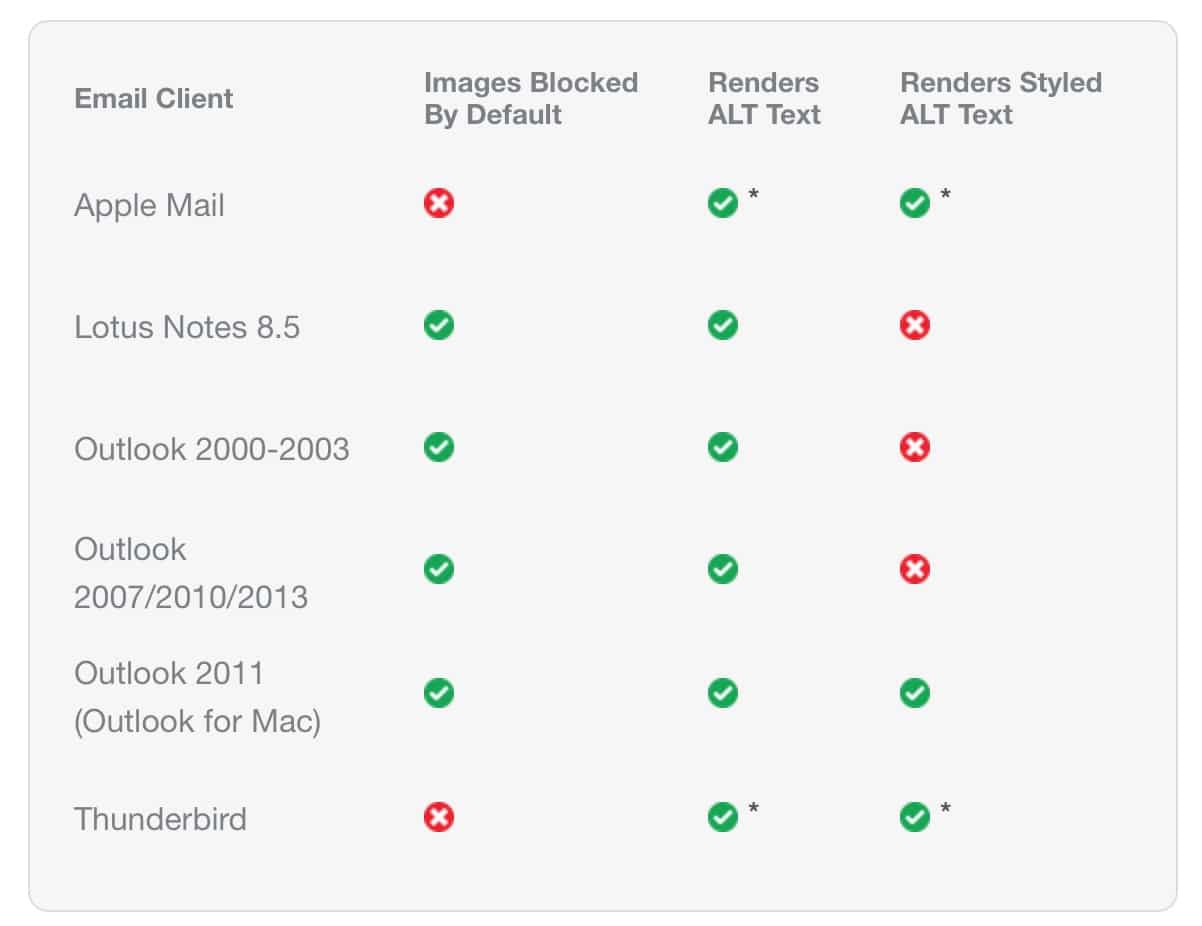
Source: Campaign Monitor
In our test, not only were the images blocked for sources such as Outlook, but they largely remained blocked, even when the other images in a newsletter downloaded.
The majority of email clients that reliably display embedded images (being Apple and iOS Mail) don’t block images by default, making this technique redundant.
Marketing materials: how do I embed a flyer in an email?
When it comes to email marketing, many want to know how to send a full flyer, such as the example of the Lincoln MKS flyer above.
Depending on the web client, and as long as it’s HTML-enabled, some users may be able to embed a flyer into their emails by going through the following steps:
- Click on the “Insert” tab
- Click on “Picture” option
- Select the flyer image file
- Review the email and flyer
- Hit send
For those who aren’t certain about HTML coding and all that it involves, there are many marketing tools, such as the ones provided through our services, that help guide you in the process of creating flyer-like email campaigns that you can then send to your subscribers.
Embedded Images Wrap up
Based on research findings, image embedding in HTML emails is still something of a delicate subject. Some methods work well with specific email clients, while others struggle.
With no fool-proof way of ensuring that images get seen by email subscribers, what are some methods that email marketers can utilize to make their emails user-friendly?
- Always have a balance between text and images. Doing so will mean that the email is useful to readers, even when the images don’t work, for whatever reason.
- Avoid using an image as the first item in an email. Starting with useful HTML text content will allow readers to preview what the email is about before they open it.
- Make use of ALT attributes. Alt Attributes in HTML specifies an alternate set of text in case an embedded image won’t display. This function helps keep your email usable to the subscriber if images don’t come through.
- Make use of captions. Many marketers choose to create wonderful images that contain vital information for their subscribers. However, these images can easily be blocked by email clients. By using image captions, readers will still be able to get that vital information, even when the image refuses to load.

Source: Campaign Monitor
No matter what your level of HTML knowledge is, Campaign Monitor can help you build stunning emails campaigns that will get seen by your subscribers. Through the Email Builder or our HTML editor, we’ll help guide you through the process, so contact us today for your free trial!