3 minute read time
How to generate better campaigns with less effort
One email campaign can send you bouncing between a blank draft, an image search, your brand files, and whatever you use for social. Add a separate AI assistant for each job, and you may end up briefing the same campaign four times. But when your email marketing platform can take on those different parts of campaign generation, you can skip much of that back-and-forth. Here’s how you can create email campaigns with AI to speed up production while keeping each decision in your hands.
Give AI the context to start on brand
The more often you have to re-explain your brand to an AI tool, the less time you’re really saving. A better setup gives the tool that context up front, then carries it into the content you create—without needing reminders along the way.
Marketing Studio does that through Brand Hub, which pulls your logo, colors, imagery, and tone of voice from your existing website. Once that’s in place, you generate with Email Workspace and Creative Lab reflect your brand from the start instead of requiring another round (or ten) of cleanup afterward.
Set a clear goal for the campaign
Once your brand is in place, decide what this email needs to achieve and what you want the reader to do next. That gives AI a clear direction for the message and call to action. It also keeps you from regenerating your way toward a strategy you haven’t entirely decided on yet.
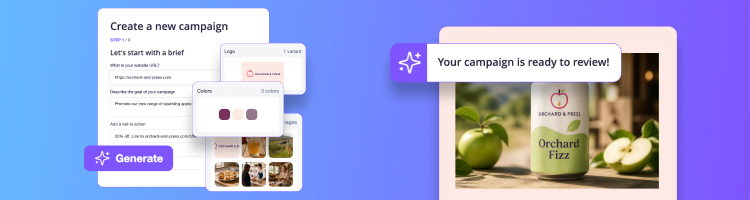
In Marketing Studio, Email Workspace starts with the goal you choose and uses it to create a complete, on-brand email campaign. From there, you can make any adjustments you need directly in the email builder before you send.
Create email copy and visuals together
When you’re building out a campaign idea, copy and visuals often develop alongside each other. A headline might spark an image idea, while a new visual might change how you frame the message. When those decisions happen in separate tools, even a small edit can mean another round of downloading, uploading, and rebriefing.
Creative Lab lets you generate and refine a custom image or banner directly in the email builder, where you can review it alongside the copy. Both stay editable, so you have the final say before anything goes out to your audience.
Adapt your campaign for another audience or channel
Finishing the email doesn’t always mean you’re finished with the campaign. If the same message needs to reach an audience in another language or carry over to another channel, it’s a real time- and sanity-saver to build from what you’ve already created instead of starting over.
Create a translated version without changing the original
Marketing Studio’s Translation feature creates a separate version of your campaign in the language you choose while keeping the original intact. You can review the translation alongside your original and make any edits you want before sending the translated version.
Turn the email into a social post
If you want to extend the campaign beyond email, Social Suite can turn the completed campaign into a ready-to-publish Instagram post with copy, hashtags, and an image. You can review the full post and make any changes you’d like before publishing.
Bring campaign creation together with Marketing Studio
Marketing Studio brings the different parts of campaign creation into one place, so each step can build on the last without starting over. Create the email, generate custom visuals, and adapt the finished campaign for another audience or channel—all while keeping the final decisions in your hands.